Notes-Ki
Notes-Ki allows you to insert text and image notes into the ...
- Type
- Audio Effect
- Author
- killihu
- Version
- 1.0
- License
- Commercial
- Live version
- 12.1.1
- Max version
- 8.6.4
- Downloads
- 0
- Updated
- 2024-12-27
Notes-Ki is an Audio Effect for Ableton Live by killihu, distributed as a commercial (paid) device. It targets Live 12.1.1 and Max 8.6.4. First published 2024-11-22, last updated 2024-12-27. 1 user comment below.
New to Max for Live? Read what Audio Effects do, what the Commercial license means, how to install a device.
Description
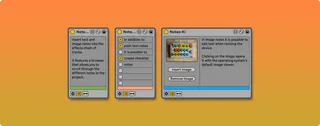
Notes-Ki allows you to insert text and image notes into the effects chain of tracks. It features a browser that allows you to scroll through the different notes in the project, making the track where they are located visible and putting the focus on the notes.
There are 3 types of notes that can be used: Text, Checklist and Image. So you can use them as simple information notes, reminders of things to do or screenshots of your external hardware.
When you use Image notes and click on the image, it opens with the default image viewer of the operating system.
In Live 12, the image can be automatically copied to the project folder. So the project can be shared with other users and the correct path to the image will be maintained.
It is possible to set the color of each note and it will be displayed in the browser as well. So you can create a color system based on the importance or purpose of each note.
See details and changelog at:
https://killihu.vstskins.com/notes-ki/
Comments (1)