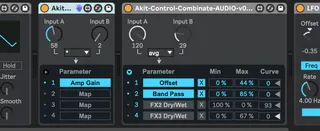
Combinate-Control Signal Combiner-Modulation Mix
(Midi Chain version) Akit Combinate is a simple devi...
- Type
- MIDI Effect
- Author
- peterlaar
- Version
- 0.2
- License
- AttributionNonCommercialShareAlike
- Live version
- 11.3
- Max version
- 8.5.8
- Downloads
- 337
- Updated
- 2025-01-28
Combinate-Control Signal Combiner-Modulation Mix is a MIDI Effect for Ableton Live by peterlaar, distributed as Creative Commons Attribution-NonCommercial-ShareAlike. It targets Live 11.3 and Max 8.5.8. On maxforlive.com it has 337 downloads. First published 2024-11-30, last updated 2025-01-28. 8 user comments below.
New to Max for Live? Read what MIDI Effects do, what the AttributionNonCommercialShareAlike license means, how to install a device.
Description
(Midi Chain version)
Akit Combinate is a simple device to take 2 control/modulation signals A & B (or 1 signal and a fixed number) and combine or mix them, mapping the output to another device. Combine the signals with one of 11 different operators:
* just A/just B: just pass through one signal (e.g. if automating changes to operator)
* arithmetic operators: +, -, *, /
* exponent: A ^ B
* log: log(base B) of A
* avg: average of A & B
* min: lower of the two values
* max: higher of the two values
* mod: A modulo B -- a.k.a. clock math, 15 mod 12 = 3
* scale: scale the full range of A from 1 to B -- e.g. if you wanted a knob to go only from, say, 1 to 3
You can set the output to a particular range with the Min/Max stage, and then the output goes to the mapped device's knob/slider/etc.
Handy device for those who like to use Ableton like a big modular synth. Small footprint, you can string multiple of these together for more complex operations if desired.
Short demo: https://www.youtube.com/watch?v=L9dXw0BqAHI
Audio chain version here: https://maxforlive.com//library/device.php?id=11663
Version History:
0.3: bugfix and change knobs from 0-127 to 0-100. additional operators (B-A, B/A, etc)
0.2: incorporates the device mapping from Live's built-in MultiMap, allowing up to 4 mapped devices.
Comments (8)
(I don't know the Modulation Map device-- where'd you find that? I might not have written this if I had that:)
But looks like your device has more combination options.
When i click map: it looks like it's correctly mapped, it even shows the name of the modulated parameter on your device, but then nothing happens and the knob that is supposed to be mapped can move freely :(
I correct myself: the parameter supposed to be automated is not free to move as i said previously.... in fact it is stuck at the value set by the Min parameter on your device, raising the Min parameter offset the value of the mapped parameter, i hope this helps....