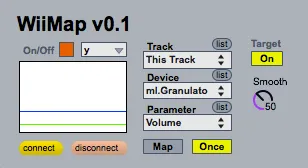
WiiMap
WiiMap is a simple WiiRemote-based control device for Max fo...
- Type
- Instrument
- Author
- rickygraham
- Version
- 0.1
- License
- Attribution
- Live version
- 8.3
- Max version
- 6.0.4
- Downloads
- 6
- Updated
- 2012-06-28
WiiMap is an Instrument for Ableton Live by rickygraham, distributed as Creative Commons Attribution. It targets Live 8.3 and Max 6.0.4. On maxforlive.com it has 6 downloads. First published 2012-06-26, last updated 2012-06-28. 10 user comments below.
New to Max for Live? Read what Instruments do, what the Attribution license means, how to install a device.
Description
WiiMap is a simple WiiRemote-based control device for Max for Live. The user may map any axis of a WiiRemote to any available parameters within Ableton Live with great ease. Smooth controller values using the "scale" device parameter (default is 50). Shorter interpolation times are recommended for tighter coupling (control intimacy).
This control device utilises [disis.aka.wiiremote] from http://ico.bukvic.net/Max/, which can be added to your Max directory. (Linked device is frozen!)
WiiMap can be applied to any MIDI or Audio track within Live.
Initialization Guide:
1) Switch on Bluetooth
2) Hold buttons 1 + 2 together on WiiRemote
3) Click Connect
4) Switch on/Start Metro
Coming soon: PitchMap v0.1 - Map and morph between pitch contours as a method of performance control using pitch tracking methods in Max/MSP.
http://rickygraham.com
Comments (10)
http://cycling74.com/docs/max5/vignettes/core/live_freezing.html
thanks for this great idea !
please can you explain me where to install the disis folder ?
all the folder have to be in Cycling '74/max external or Cycling '74/m4l external ? or just the .mxo file...
it doesn't work for me now...
thanks !
Hi Danglesmaxime - drag the disis.aka.wiiremote.mxo file to the max-externals folder in your Max5 or Max6 folder and you're good to go. Please try the frozen version of the device also. This should also resolve your issues but it is always good to know how to configure externals within Max.
thanks
I used wiimote with OSCULATOR. It's more easy like this.
do think you'll add the wii knobs to use them as trigers ?
to activate a filter with a knob and change the freq with the "Y" for example.
In osculator you can change the knobs as a triger or a toggle. it can be great to have this fonction too ;)
many thanks !
maxime
Perhaps another PC user can contribute to the conversation?