CamMap
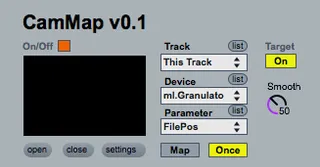
CamMap is a simple camera-based control device for Max for L...
- Type
- Instrument
- Author
- rickygraham
- Version
- 0.1
- License
- Attribution
- Live version
- 8.3
- Max version
- 6.0.4
- Downloads
- 6
- Updated
- 2012-06-28
CamMap is an Instrument for Ableton Live by rickygraham, distributed as Creative Commons Attribution. It targets Live 8.3 and Max 6.0.4. On maxforlive.com it has 6 downloads. First published 2012-06-26, last updated 2012-06-28. 6 user comments below.
New to Max for Live? Read what Instruments do, what the Attribution license means, how to install a device.
Description
CamMap is a simple camera-based control device for Max for Live. The user may map scaled pixel data to any available parameters within Ableton Live with great ease. Smooth controller values using the "scale" device parameter (default is 50). Shorter interpolation times are recommended for tighter coupling (control intimacy).
This control device utilises [cv.jit.mass] from http://jmpelletier.com/cvjit/, which can be added to your Max directory. (Linked device is frozen!)
CamMap can be applied to any MIDI or Audio track within Live.
Coming soon: PitchMap v0.1 - Map and morph between pitch contours as a method of performance control using pitch tracking methods in Max/MSP.
Comments (6)
http://cycling74.com/docs/max5/vignettes/core/live_freezing.html
when I load the patch I get this error:
cv.jit.mass: unable to load object bundle executable
2013-04-13 13:03:47.753 Max[12894:f07] Error loading /Users/marcello/Library/Application Support/Cycling '74/temp64-Max/mxt/cv.jit.mass.mxo/Contents/MacOS/cv.jit.mass: dlopen(/Users/marcello/Library/Application Support/Cycling '74/temp64-Max/mxt/cv.jit.mass.mxo/Contents/MacOS/cv.jit.mass, 262): no suitable image found. Did find:
/Users/marcello/Library/Application Support/Cycling '74/temp64-Max/mxt/cv.jit.mass.mxo/Contents/MacOS/cv.jit.mass: no matching architecture in universal wrapper
what should i do?