- Type
- MIDI Effect
- Author
- 3dot
- Version
- 0.8
- License
- None
- Live version
- 8.3
- Max version
- 5.1.9
- Downloads
- 461
- Updated
- 2012-07-24
CC Boy is a MIDI Effect for Ableton Live by 3dot, distributed as freeware, with no license specified by the author. It targets Live 8.3 and Max 5.1.9. On maxforlive.com it has 461 downloads. Published 2012-07-24. 9 user comments below.
New to Max for Live? Read what MIDI Effects do, how device licenses work, how to install a device.
Description
still work in progress..
(I'm not sure 'toggle' for buttons works as planned)
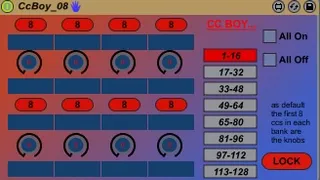
allows the mapping of 16 MIDI CC/s (8 knobs/buttons) from the MIDI track input...
to Live parameters all over the set...
therefore,, allows to record clip automations..(as MIDI CCs)
more than 1 device can be used in series..
modulation destination can be switched while looping midi ccs...
doesn't use live.remote~ so pretty decent cpu usage...
click on a knob/button to edit mapping and scaling settings...
hope it's useful..
Comments (9)
I'm at work cant really test it with a controller.
However after giving it the once over, it would be nice to see a quick video demonstration of setting it up and using it.
2.put this device on the same or different track
3. press 1-16 button and 'all on' button on ccboy
4. map 1st 2 knobs to filter and res of the synth
5. draw/record envelopes for CC1 and 2 to the midi clip in the track where the device is on
A few observations:
What do you think of 2 versions, one with buttons and one with knobs? You will have more space for labels and no conflicts.
Now the buttons seems to 'battle' with knobs.
Also if i lock the device i can normally edit things.
hence the 8 buttons+8 knobs...
I'm already workinng on a slimmer version of this...
I think if your next version will be on a single screen with no popups and without the cc blocks on the right, it will be in the top ten device of this site.
are really only useful if you want to map to the whole 128 cc range easily by having 8 of these on a track...
auto mapping a device to a 16 range and 'locking' it..