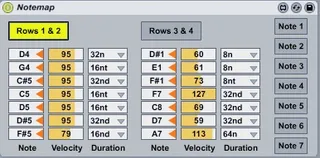
DrumSeq Notemap
The Notemap.amxd device is intended as a complement to xanad...
- Type
- MIDI Effect
- Author
- T0n1
- Version
- 1.0
- License
- AttributionShareAlike
- Live version
- 8.3.3
- Max version
- 5.1.9
- Downloads
- 963
- Updated
- 2012-08-15
DrumSeq Notemap is a MIDI Effect for Ableton Live by T0n1, distributed as Creative Commons Attribution-ShareAlike. It targets Live 8.3.3 and Max 5.1.9. On maxforlive.com it has 963 downloads. Published 2012-08-15. 3 user comments below.
New to Max for Live? Read what MIDI Effects do, what the AttributionShareAlike license means, how to install a device.
Description
The Notemap.amxd device is intended as a complement to xanadu's Launchpad DrumSeq drum sequencer device (version 1.1.23) at
http://www.maxforlive.com/library/device/352/launchpad-drumseq
I personally was not satisfied with the pitch settings workflow using menus, note values and the mouse. I wanted to dynamically teach in notes on the fly using only the Launchpad and external hardware instruments as a tighter way to hook them together:
Play a sound on any of the configured instruments, dynamically assign it to one of the 7 DrumSeq notes using only the Launchpad, incrementally build up the pattern while the sequencer is running, optionally reassign a note to another note or even another instrument without touching the mouse or looking at the computer monitor.
The Notemap.amxd device is only the main device which sits between DrumSeq (with default settings) and the instruments to transpose the notes from DrumSeq's the default pitch settings to the notes taught in. The other auxiliary patches integrated with Live's global send/receive mechanism can be downloaded from the DrumSeq Notemap subfolder at the external URL. The main folder also contains two commented example Live Sets using these devices, as their intended interplay is probably anything else than obvious. While Notemap Minimal.als only uses the Launchpad with an 808 as instrument, Notemap Real.als is more similar to my real setup: It uses an Instrument Rack containing an 808 and two external MIDI instruments (right here a Roland HandSonic and a microKORG), split with Key Zones. Therefore it will not be usable "out of the box" for other setups, but can serve as a starting point to hook together your own setup.
DrumSeq's default pitch settings and the 7 notes per row are hardcoded in the device, but as I'm releasing it under cc-by-sa, it could be adapted to other sequencers. When I started that project, I didn't immediately plan to release it sometime to the public, therefore the technical comments explaining to myself what I was trying to achieve the other day are still in German.
Usage of DrumSeq Notemap
These launchpad buttons are active in user 1 mode without manual MIDI mapping if NotemapControl.amxd is active:
(^): Chose DrumSeq's Rows 1&2 to teach in.
(v): Chose DrumSeq's Rows 3&4 to teach in.
({): Lower the velocity for the Launchpad chequerboard.
(}): Rise the velocity for the Launchpad chequerboard.
[ ]: Launchpad chequerboard: play resp. teach in MIDI notes.
(}): Right buttons 1-7: Teach in buttons for that DrumSeq note.
(}): Lowest right button 8: Light it with the current velocity value on the Launchpad and light the active Rows button to visually reflect the state of Notemap.
To teach in a new note, switch from user 2 mode (DrumSeq) to user 1 mode. At will play live on the chequerboard (or an external instrument) and adjust the default velocity of the desired sound. Then press a teach in button which will light up to signal that it is in learn mode. The next MIDI note received will be thought in (note value, velocity and duration) and the LED goes out. If the teach in button is pressed a second time without any MIDI note, it goes out, too, to signal cancellation.
Note remapping can be done on the fly when DrumSeq is playing a pattern.
Comments (3)
In DrumSeq/Notemap terms: instead of "Pitch settings -> Row 1 -> Note 1 -> set the value to C1" just hit that note pad on the Launchpad or a key on an external instrument.