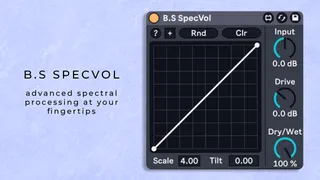
B.S SpecVol - Spectral Volumeshaping
Elevate your sound design with this Spectral Volumshaping pl...
- Type
- Audio Effect
- Author
- bsaudiotools
- Version
- 1.0
- License
- Commercial
- Live version
- 12.0.5
- Max version
- 8.6.2
- Downloads
- 0
- Updated
- 2025-04-02
B.S SpecVol - Spectral Volumeshaping is an Audio Effect for Ableton Live by bsaudiotools, distributed as a commercial (paid) device. It targets Live 12.0.5 and Max 8.6.2. First published 2025-03-17, last updated 2025-04-02.
New to Max for Live? Read what Audio Effects do, what the Commercial license means, how to install a device.
Description
Elevate your sound design with this Spectral Volumshaping plugin – a cutting-edge Max for Live tool engineered for precise spectral processing in Ableton Live. Transform your audio by changing the volume of individual frequencies based on their loudness using a freely drawable transfer function. This innovative device empowers producers and sound designers to sculpt sound with unprecedented control and efficiency.
Key Features & Highlights:
- Freeform Transfer Function: Draw custom transfer curves in just a few clicks to achieve effects ranging from spectral gate/limiter to complex, tailor-made shapes.
- Efficient Workflow: Enjoy an intuitive interface with essential controls, allowing you to experiment with diverse effects swiftly and effortlessly.
- Tilt Control: Adjust the spectral balance of your processing with a dedicated tilt control, perfect for fine-tuning the tonal character of your sounds.
- Randomization: Add a creative edge with smart randomization features.
- Dynamic FFT Size and Overlap: Benefit from flexible FFT settings that adapt to your audio, ensuring optimal resolution and smooth processing.
- Dual Stage Distortion: Restore and enhance processed sounds with a dual stage distortion that fatten thin audio, adding warmth and character.
Support & Community:
For any questions or support regarding the device, please email [email protected]. We also encourage you to watch the walkthrough video before reaching out to ensure you get the most out of your plugin.
Happy Music Making!