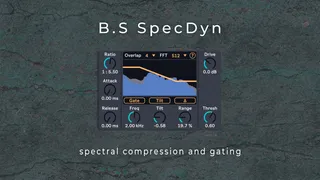
B.S SpecDyn - Easy Spectral Dynamics
Experience a new level of spectral control with B.S SpecDyn,...
- Type
- Audio Effect
- Author
- bsaudiotools
- Version
- 1.0
- License
- None
- Live version
- 12.0.5
- Max version
- 8.6.2
- Downloads
- 0
- Updated
- No Updates
B.S SpecDyn - Easy Spectral Dynamics is an Audio Effect for Ableton Live by bsaudiotools, distributed as freeware, with no license specified by the author. It targets Live 12.0.5 and Max 8.6.2. Published 2025-10-17.
New to Max for Live? Read what Audio Effects do, how device licenses work, how to install a device.
Description
Experience a new level of spectral control with B.S SpecDyn, a fast yet incredibly powerful device for Ableton Live. Think of it as a precise multiband gate and compressor that works across the entire frequency spectrum, offering up to 2048 bands for detailed sound manipulation. Whether you need subtle spectral polishing or dramatic sonic transformations, B.S SpecDyn is designed for a fast and effective workflow.
Key Features:
- Dual Processing Modes: Choose between "Comp" mode to tame specific frequency regions or add thickness , and "Gate" mode to clean up noise or create thin spectral effects.
- Intuitive Threshold Shaping: Precisely match (and automate) the threshold to your audio's spectral content using the Tilt, Frequency, and Range controls. Switch between Tilt and Peak modes to target specific frequencies with a notch or peak shape.
- Global Dynamics Control: Quickly dial in your settings with global Attack, Release, and Ratio knobs that provide easy control over the core dynamics.
- Built-in Harmonic Distortion: Add harmonics and fatten up your sound with a dual-stage overdrive, which is especially useful for adding body back to heavily gated signals.
- Delta Monitoring: Use the Delta button to listen to only the part of the signal being removed or affected by the processing, ensuring you make the right adjustments.
- Advanced FFT Settings: Balance the trade-off between time and frequency resolution with adjustable FFT Size and Overlap controls to suit any audio source.
Support:
For any questions or support regarding the device, please email [email protected]. We also encourage you to read the manual before reaching out to ensure you get the most out of your plugin.
Happy Music Making!