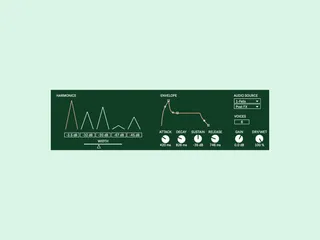
Fells
Play any sound source using resonant filters spaced along th...
- Type
- MIDI Effect
- Author
- whatnot
- Version
- 1.0
- License
- None
- Live version
- 12.1.10
- Max version
- 8.6.5
- Downloads
- 0
- Updated
- 2025-04-22
Fells is a MIDI Effect for Ableton Live by whatnot, distributed as freeware, with no license specified by the author. It targets Live 12.1.10 and Max 8.6.5. First published 2025-04-13, last updated 2025-04-22. 2 user comments below.
New to Max for Live? Read what MIDI Effects do, how device licenses work, how to install a device.
Description
Play any sound source using resonant filters spaced along the harmonic series. It's free!
The device can be added to an Ableton Live midi track and any other track or external input can be chosen as the audio source and then the incoming sound can be played (note: the incoming source will need to be playing for fells to produce sound).
Fells works particularly well on sound sources with broad frequency ranges such as white noise or field recordings or rhythmic sources such as drum breaks.
Usage:
1. You will need an existing track that is outputting audio or an external input source that you wish to be played by Fells.
2. Add Fells to a new midi track.
3. In the 'Audio Source' menu select your existing audio track or input. When using a track that you only want to be heard through Fells you might like to mute the track and choose 'Post FX' as your source point.
4. Add a midi clip or arm your midi track so that you can control Fells.
5. Press play in Ableton Live so that sound is coming in to Fells, or start your external source.
6. Fells should now produce sound whenever a midi note is played (and when there is also sound coming in to Fells).
Live 11/Max 8.2 required.
Comments (2)
I'll add a note about requiring Live 11+.