STEREOID
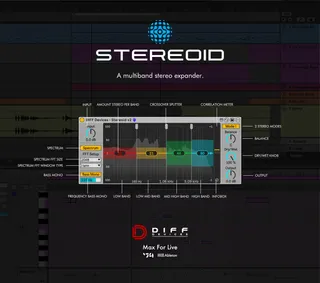
STEREOID is an impressive Max for Live device to precisely a...
- Type
- Audio Effect
- Author
- DiffDevices
- Version
- 2.0
- License
- None
- Live version
- 12.0.5
- Max version
- 8.6.2
- Downloads
- 0
- Updated
- 2025-06-30
STEREOID is an Audio Effect for Ableton Live by DiffDevices, distributed as freeware, with no license specified by the author. It targets Live 12.0.5 and Max 8.6.2. Published 2025-06-30. 2 user comments below.
New to Max for Live? Read what Audio Effects do, how device licenses work, how to install a device.
Description
STEREOID is an impressive Max for Live device to precisely adjust stereo width on your tracks or your master.
FEATURES 2.0:
• 2 Modes (modern and old Stereoid algorythm)
• Stereo Width per band ( 4 bands )
• Adjustable Frequency bands
• Bass Mono On/Off
• Spectrum display
• Correlation Meter
• Mix Signal
• GUI match Ableton Live Themes
INSTALATION & USAGE GUIDE
Inside the zip file you have an file :
1. DIFF Devices - Stereoid.amxd
2. Save the .amxd file anywhere on your computer or in a folder that you previously saved your maxforlive devices.
3. Drag and drop the device into a midi track.
4. Click on save (on the right hand side of the window: with a 'floppy disk' icon)... (Check Manual.)
5. This will automatically save the device to your ‘User Library’ folder in ‘Places’ (the ‘head outline’ icon), and will also save a '.adv' file which can be used to store your favourite initial setup.
6. You’re good to go.
SYSTEM REQUIREMENTS
• MAC & WIN
* Only works in Ableton Live with Max installed.
* It Requires Ableton Live V11 (minimum).
* M1 Mac Compatible.
Comments (2)