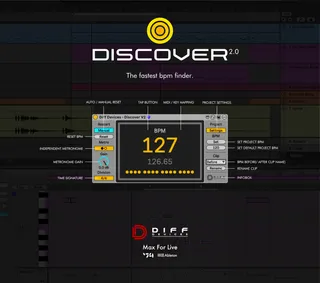
DIFF Devices - DISCOVER
DIFF Devices - Discover V2 The fastest BPM finder. ...
- Type
- Audio Effect
- Author
- DiffDevices
- Version
- 2.0
- License
- Commercial
- Live version
- 12.0.5
- Max version
- 8.6.2
- Downloads
- 0
- Updated
- No Updates
DIFF Devices - DISCOVER is an Audio Effect for Ableton Live by DiffDevices, distributed as a commercial (paid) device. It targets Live 12.0.5 and Max 8.6.2. Published 2025-08-26.
New to Max for Live? Read what Audio Effects do, what the Commercial license means, how to install a device.
Description
DIFF Devices - Discover V2
The fastest BPM finder.
Simply put discover on a track (midi or audio) and tap to find the bpm.
Sometimes Warp doesn't work so good in ableton with this tool it's super easy and fast to find the bpm.
*It requires Ableton Live with Max instaled.
--
FEATURES 2.0:
• New Interface
• GUI match Ableton Live Themes
• Midi / Key Mapping for Tap Button
• Auto / Manual Reset
• Internal metronome with volume adjust
• Signature division (4/4, 3/4 for triplet)
• Set project tempo based on BPM finder
• Clip Renamer
• Bug Fixes from Version 1.
INSTALATION GUIDE :
Inside the zip file you have an file :
1. DIFF Devices - Discover 2.0.amxd
2. Save the .amxd file anywhere on your computer or in a folder that you previously saved your maxforlive devices.
3. Drag and drop the device into a midi track.
4. Click on save (on the right hand side of the window: with a 'floppy disk' icon)... (Check Ableton Manual.)
5. This will automatically save the device to your ‘User Library’ folder in ‘Places’ (the ‘head outline’ icon), and will also save a '.adv' file which can be used to store your favourite initial setup.
6. You’re good to go.
--
SYSTEM REQUIREMENTS :
• MAC & WIN
• Only works in Ableton Live with Max installed.
• It Requires Ableton Live V12 (minimum).
• M1 Mac Compatible.
*** INCLUDES BOTH VERSIONS V1 and V2