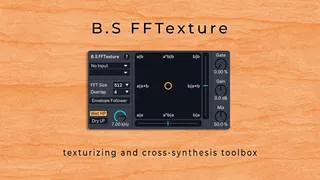
B.S FFTexture - Texturizing and Cross-Synthesis
Tired of flat, lifeless audio? B.S FFTexture is a powerful M...
- Type
- Audio Effect
- Author
- bsaudiotools
- Version
- 1.0
- License
- Commercial
- Live version
- 12.0.5
- Max version
- 8.6.2
- Downloads
- 0
- Updated
- 2025-07-25
B.S FFTexture - Texturizing and Cross-Synthesis is an Audio Effect for Ableton Live by bsaudiotools, distributed as a commercial (paid) device. It targets Live 12.0.5 and Max 8.6.2. Published 2025-07-25.
New to Max for Live? Read what Audio Effects do, what the Commercial license means, how to install a device.
Description
Tired of flat, lifeless audio? B.S FFTexture is a powerful Max for Live device that breathes new life into your sounds, letting you sculpt, mangle, and morph audio in ways you've never imagined.
At its heart is an intuitive X/Y pad that lets you seamlessly blend and cross-synthesize between two sound sources. Add organic movement with a responsive envelope follower, clean up your signal with a well tuned spectral gate, or dial in some analog-style grit with the rich, built-in distortion.
What can you do with it?
- Add Instant Texture: Sprinkle complexity and detail onto synths, drums, or samples.
- Rescue Your Sound: Reintroduce texture and harmonics that were lost during heavy EQing, compression or distortion.
- Advanced Cross-Synthesis: Create entirely new sounds by morphing the spectral qualities of two different sources.
- Color Bass Design: Perfect for style and tonality transfer, letting you imprint the tonality of one sound onto another.
- Creative Filtering: Filter your sound with any source, even an external wavetable synth. (Did I hear Filtertable?)
- Feedback Synthesis: Push the boundaries by easily creating feedback loops and exploring new territories of sounddesign.
Key Features:
- Morph Pad: Intuitively blend between two audio signals.
- Sidechain Input: Use any Audio source.
- Envelope Follower: Dynamic volume control to fit the texture to your input.
- Spectral Gate: Noise reduction for clean textures.
- Wet/Dry Filtering: Precise texture layering.
- Built-in Drive: Add grit and warmth.
Support:
For any questions or support regarding the device, please email [email protected]. We also encourage you to read the manual before reaching out to ensure you get the most out of your plugin.
Happy Music Making!