- Type
- MIDI Effect
- Author
- DavidParker
- Version
- 1.0
- License
- None
- Live version
- 8.2.6
- Max version
- 5.1.9
- Downloads
- 452
- Updated
- 2012-10-22
cc2param is a MIDI Effect for Ableton Live by DavidParker, distributed as freeware, with no license specified by the author. It targets Live 8.2.6 and Max 5.1.9. On maxforlive.com it has 452 downloads. First published 2012-10-18, last updated 2012-10-22. 2 user comments below.
New to Max for Live? Read what MIDI Effects do, how device licenses work, how to install a device.
Description
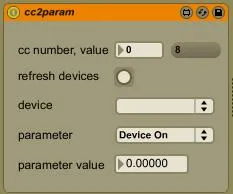
Converts MIDI cc messages to a device parameter of your choice. Converts cc range (0 - 127) to parameter range automatically. Instructions: type in the cc number, refresh the device list, choose device and parameter.
I made this for my own use because I couldn't find anything else that did exactly what I wanted. Its purpose is to allow cc messages that are generated from within Live (from MIDI files, automation or generator devices) to control device parameters. It is very basic and doesn't follow ay of the Max for Live production guidelines, but hopefully it will be useful to others.
Comments (2)