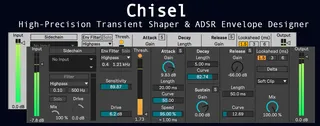
Chisel - Transient Shaper and Envelope Designer
High-Precision Transient Shaper & ADSR Envelope Designer ...
- Type
- Audio Effect
- Author
- unmouldsound
- Version
- 0.3.0
- License
- Commercial
- Live version
- 12.2
- Max version
- 9.0
- Downloads
- 0
- Updated
- 2025-11-13
Chisel - Transient Shaper and Envelope Designer is an Audio Effect for Ableton Live by unmouldsound, distributed as a commercial (paid) device. It targets Live 12.2 and Max 9.0. First published 2025-11-05, last updated 2025-11-13.
New to Max for Live? Read what Audio Effects do, what the Commercial license means, how to install a device.
Description
High-Precision Transient Shaper & ADSR Envelope Designer
== BETA RELEASE ==
Sculpt, isolate and re-shape the attack, sustain and release of any audio signal — drums, synths, guitars or vocals — with precise control. Chisel offers phase-by-phase envelope shaping and sidechain input in a compact, low‑CPU Max for Live device, optimized with Gen~ and RNBO for sample‑accurate processing and high performance.
Main features:
- Hear and process each envelope phase independently — Attack (Attack + Hold + Decay), Sustain, Release — with per‑phase Solo buttons. Isolate a snare’s initial hit, sculpt the body of a pad, or tighten the tail of a vocal.
- Per‑phase Gain, Length and Curvature controls let you precisely shape dynamics and timing. The Attack section includes a Speed control: when Speed > 0% a Hold stage is inserted before Decay, and the time (ms) shown beneath Speed indicates how long it takes to reach the Attack gain.
- Sidechain input with its own filter and drive — use an external trigger to duck or re‑shape audio dynamically.
- Envelope filter section with Solo, filter and drive.
- Both filters include Type (Lowpass/Highpass/Bandpass), Cutoff/Center frequency and Q controls.
- Sensitivity slider to tune how the detector responds.
- Attack energy meter for visualizing transient strength, plus a Threshold slider to set the detection level.
- Hard, Soft and No Clip modes.
- Mix control to blend processed and dry signals.
- Lookahead (1.5 / 3 / 6 ms).
- Delta mode monitors only the processing added by the device (Wet minus Dry).
- Input and Output meters and sliders for gain staging.
- Documentation is available in the Info View of Ableton for each parameter.
Audio examples are available in the device's product page.
The device is free until its official release; please note it may still contain minor bugs. For support, reach out to [email protected]. Enjoy!