Remove Silence
Remove silence is a max patch that lets you automatically re...
- Type
- Audio Effect
- Author
- MatanZohar
- Version
- 2.0
- License
- Commercial
- Live version
- 12.0.5
- Max version
- 8.6.2
- Downloads
- 0
- Updated
- No Updates
Remove Silence is an Audio Effect for Ableton Live by MatanZohar, distributed as a commercial (paid) device. It targets Live 12.0.5 and Max 8.6.2. Published 2025-11-03. 1 user comment below.
New to Max for Live? Read what Audio Effects do, what the Commercial license means, how to install a device.
Description
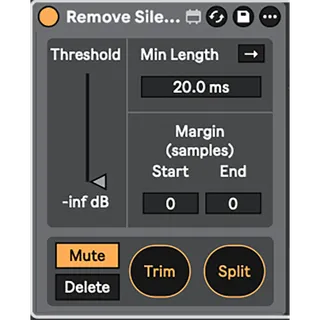
Remove silence is a max patch that lets you automatically remove silence from audio clips, and also trim silence from the beginnings and ends of clips.
You can select two different modes, Mute and Delete.
The threshold is the level at which the device detects silent portions of audio.
The Min Length is the minimum length of the non-silent portions of the audio clip.
The Margin settings determine how much headroom (in samples) to leave at the start and end of each non-silent portions of audio.
This device works for Ableton Live 12 and above or Max 9 and above only
Comments (1)