- Type
- Audio Effect
- Author
- Supertramp162
- Version
- 1.1
- License
- None
- Live version
- 12.0.5
- Max version
- 8.6.2
- Downloads
- 850
- Updated
- No Updates
The Shepard is an Audio Effect for Ableton Live by Supertramp162, distributed as freeware, with no license specified by the author. It targets Live 12.0.5 and Max 8.6.2. On maxforlive.com it has 850 downloads. Published 2025-12-06.
New to Max for Live? Read what Audio Effects do, how device licenses work, how to install a device.
Description
The Shepard — Max for Live Audio Effect
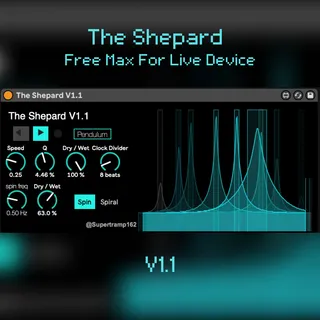
The Shepard is a spectral modulation tool built by Stephen Black. It uses fixed-filter banks to emulate the illusion of a rising or falling Shepard tone—but designed as a creative audio effect rather than a pitch illusion.
At its core, The Shepard sweeps multiple resonant bands across the frequency spectrum, creating movement that can feel cyclic, ascending, descending, or suspended in motion. Perfect for transitions, drones, ambient sound design, and adding evolving motion to static sources.
Key Features
Rising / Falling Shepard Motion
Select the direction of the spectral sweep to create upward or downward motion.
Pendulum Mode (Tempo Sync)
A clock-divided bidirectional mode that alternates the sweep direction rhythmically, fully synced to Ableton Live’s tempo.
Spin & Spiral Stereo Movement
Two independent stereo modulation paths:
Spin: Circular motion in one direction
Reverse Spin: Opposing stereo motion
Spiral: Combines both for wide, immersive 3D movement
Each has its own wet/dry control.
Visual Spectrum Display
Animated filter-bank visualisation that shows the Shepard sweep in real time.
Full Wet/Dry Control + Speed Control
Shape the intensity and movement rate to fit rhythmic or atmospheric contexts.
Perfect For
Ambient & cinematic production
Transitions and risers
Sound design
Drone music
Adding spectral movement to pads, vocals, or textures
If you like my work and wish to collaborate or contact me, the best place to do so is through my instagram @supertramp162.
🔗 Find me here
Instagram: @supertramp162
Max for Live devices: www.maxforlive.com/profile/user/supertramp162
KVR Audio: www.kvraudio.com/developer/supertramp162
Youtube: www.youtube.com/@Supertramp162