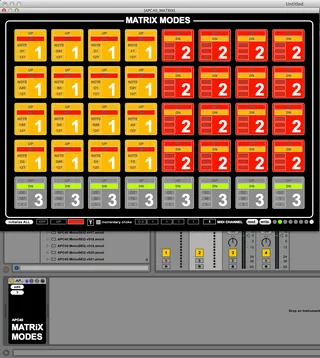
APC40 MATRIX MODES
This patch toggles the APC40's Matrix between default mode,...
- Type
- MIDI Effect
- Author
- JuanSOLO
- Version
- 1.4
- License
- None
- Live version
- 9
- Max version
- 6.1
- Downloads
- 2,370
- Updated
- 2013-02-23
APC40 MATRIX MODES is a MIDI Effect for Ableton Live by JuanSOLO, distributed as freeware, with no license specified by the author. It targets Live 9 and Max 6.1. On maxforlive.com it has 2,370 downloads. First published 2013-01-06, last updated 2013-02-23. 7 user comments below.
New to Max for Live? Read what MIDI Effects do, how device licenses work, how to install a device.
Description
This patch toggles the APC40's Matrix between default mode, and a custom user mode. Works by pressing the Track Selection button for the track this device is on.
Works great for sending midi notes, CC's or PGM#'s
QUICK START
Drop the device on a Midi Track.
Read the "?" file.
Now click the edit button and get to making your custom Matrix Mode.
You should be able to put these on multiple tracks, and configure each one for each track.
Last UPDATE 2/23/2013
THINGS TO DO
1. Find a better preset solution
2. See if I can figure out how to select a portion of the Matrix Editor and change values of the selected portion
3. Make selecting Track with the mouse reflect changes.
4. Possibly find a better solution for recording notes into clips and avoiding midi loops.
5. Maybe use the Device Knobs in edit mode to edit each button via APC40.
6. Make Scene Launch and Stop Clips do something, or perform default functions when the mode is enabled.
Tell me what you think.
Comments (7)
You would have to disable the matrix, then tell half the matrix to interpret clip launching/recording depending on where the red box was at.
Definitely possible, but too much work for me to take on.
Also when I save the preset with the live browser and load it again all my changes are lost.
It would be also nice if the 8 Stopbuttons are automatically maped to the 8 Presetslots - very powerful when it works!
its the goddamn 64 slot loopstation!!
shes here! shes wants your blood!
http://www.maxforlive.com/library/device/1846/looppad-64
The best advice I have on this kind of stuff, is get the "Live API explorer" device, learn it.
Ask a lot of questions at the maxforlive Ableton forum, and the cycling74 M4L forum.