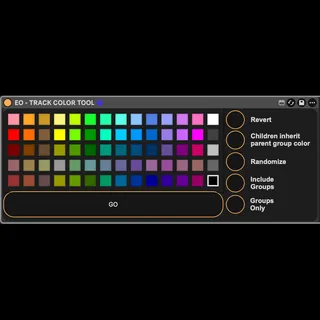
Element One Track Color Tool - v
WALKTHROUGH VIDEO: https://youtu.be/VkXmg-TbVHo One o...
- Type
- Audio Effect
- Author
- ElementOne
- Version
- 11.0
- License
- Commercial
- Live version
- 12.1
- Max version
- 9
- Downloads
- 0
- Updated
- 2025-12-25
Element One Track Color Tool - v is an Audio Effect for Ableton Live by ElementOne, distributed as a commercial (paid) device. It targets Live 12.1 and Max 9. Published 2025-12-25.
New to Max for Live? Read what Audio Effects do, what the Commercial license means, how to install a device.
Description
WALKTHROUGH VIDEO: https://youtu.be/VkXmg-TbVHo
One of the most valuable skills to have when mixing large sessions is simply ***staying organized*** and I’ve built a Max For Live device to make color-coding your large sessions as easy as clicking a button. Born out of necessity, I needed a device that helped me to quickly color non-group tracks for better visibility in my client's large mixing sessions. I have since refine it to broaden it's scope and now I offer it to you!
It's not perfect, but it works for what I needed and hopefully you'll find some benefit in it too. I'll be trying to make some incremental improvements to it in what little spare time I have, but for now, what you see is what you get.
Features:
-Color any non-group track to the selected color
-Randomize all track colors
-Randomize all group tracks colors
-Randomize all top-level groups and their contents
-Revert to some unpredictable form of previous state??? (buggy)
Minimum Requirements: Ableton Live 12 + Max 9
AVAILABLE NOW AS A PAY WHAT YOU WANT VIA GUMROAD
FOLLOW ME ON INSTA AND YOUTUBE FOR MIXING TIPS, PLUGINS, AND MORE: linktr.ee/clintmoody