MapTroggle
Place this on any drum rack chain and use a the drum pad, pu...
- Type
- MIDI Effect
- Author
- mtfo
- Version
- 1.0
- License
- None
- Live version
- 12.0.5
- Max version
- 8.6.2
- Downloads
- 0
- Updated
- 2026-02-05
MapTroggle is a MIDI Effect for Ableton Live by mtfo, distributed as freeware, with no license specified by the author. It targets Live 12.0.5 and Max 8.6.2. First published 2026-01-31, last updated 2026-02-05.
New to Max for Live? Read what MIDI Effects do, how device licenses work, how to install a device.
Description
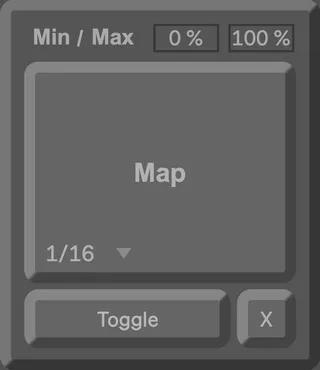
Place this on any drum rack chain and use a the drum pad, push, or midi controller to trigger or toggle mapped parameters anywhere in the set while you are focused on the drum rack.
--------------------------------
MIDI Control: Accepts any MIDI note input from drum chain and routes it to map any assignable Live parameter
Dynamic Range Mapping: Map parameter ranges with adjustable min/max values (0-100%)
Toggle/Momentary Modes: Switch between toggle mode (persistent state) or momentary mode (spring-back behavior). Quantize the midi input with the menu or chose Free to troggle un-quantized.
One-Click Mapping: Activate the Map button to select which Live parameter to control—just click any parameter in Live and it's automatically assigned
Invert Control: Flip the control direction when minimum is greater than maximum
Unmap Function: Quickly disconnect from the current parameter and assign a new one
Visual Feedback: Changes the color of the drum rack chain it is on, blue (un-mapped), green (off/min), and red (on/max). This makes the Push2 drum rack pads change color to represent when the mapped parameter is On/Off.