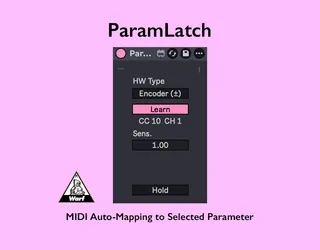
ParamLatch
MIDI Auto-Mapping to Selected Parameter - Control the par...
- Type
- MIDI Effect
- Author
- warf
- Version
- 1.7.6
- License
- None
- Live version
- 12.0.5
- Max version
- 8.6.2
- Downloads
- 0
- Updated
- 2026-02-16
ParamLatch is a MIDI Effect for Ableton Live by warf, distributed as freeware, with no license specified by the author. It targets Live 12.0.5 and Max 8.6.2. First published 2026-01-29, last updated 2026-02-16. 6 user comments below.
New to Max for Live? Read what MIDI Effects do, how device licenses work, how to install a device.
Description
MIDI Auto-Mapping to Selected Parameter
- Control the parameter you select
- Supports both standard knobs (Pots) and encoders (Endless)
- Minimal device width to save screen space
setup:
- Connect your MIDI device to Live with the right cable.
- Go to Live’s Settings and enable the MIDI input port for your device (make sure Track is turned on for that port).
- Open the I/O section.
- On a MIDI track, select your device in the MIDI From dropdown.
- Set the track monitor to In so it always receives incoming MIDI.
Then press the Learn button in ParamLatch and move a knob on your MIDI controller up and down widely for about 3 seconds.
Release notes
- v1.7.3 first Release
- v1.7.4 Fixed 2’s Complement encoder detection
- v1.7.5 Added support for Signed Bit relative encoders
- v1.7.6 Reluctantly set width to 110px (Live adds padding with Push active).
Comments (6)
Sorry, I don’t have a proper manual ready yet 🙏
Could you try this setup:
- Connect your MIDI device to Live with the right cable.
- Go to Live’s Settings and enable the MIDI input port for your device (make sure Track is turned on for that port).
- Open the I/O section.
- On a MIDI track, select your device in the MIDI From dropdown.
- Set the track monitor to In so it always receives incoming MIDI.
Then press the Learn button in ParamLatch and move a knob on your MIDI controller up and down widely for about 3 seconds.
First, please set the HW Type to match your controller:
If you’re using an endless rotary encoder, choose “Encoder (±)”
If you’re using a standard knob (potentiometer), choose “Pot (0–127)”
After that, if it’s still not working properly, I need to clarify this part:
> “but a lot of times when I am switching on other knobs it is not working”
When you say “other knobs”, are you talking about other parameters in Live that you select and try to control with the same hardware knob?
In other words, when you turn the hardware knob, does the first parameter in Live change value correctly, but after you click a different parameter, turning the knob no longer changes that parameter’s value?
If that’s the case, please make sure the Hold button is turned off.
If it’s hard to describe the behavior in words, could you share a short video showing what you do and what happens on screen? That would help a lot.
I’ve fixed the encoder detection. Please download it again and confirm it’s working properly.