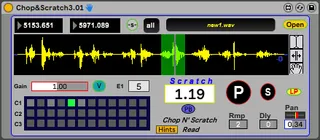
Chop N Scratch
Watch a clip here- https://ziob.gumroad.com/l/geirq?_gl=1...
- Type
- Audio Effect
- Author
- Ziob
- Version
- 3.02
- License
- Commercial
- Live version
- 12.0.5
- Max version
- 8.6.2
- Downloads
- 0
- Updated
- No Updates
Chop N Scratch is an Audio Effect for Ableton Live by Ziob, distributed as a commercial (paid) device. It targets Live 12.0.5 and Max 8.6.2. Published 2026-02-25.
New to Max for Live? Read what Audio Effects do, what the Commercial license means, how to install a device.
Description
Watch a clip here-
https://ziob.gumroad.com/l/geirq?_gl=1*qzsbsn*_ga*NTAxMjgxODk5LjE3NzE4NDE3NDI.*_ga_6LJN6D94N6*czE3Nz
ABOUT 'Chop N' Scratch' -
The very new version of the 'Chop N' Scratch' is much simpler and efficient, with new features and much better inner mechanism.
Chop N' Scratch – An Ableton 'Max For Live' Plugin Device.
A user friendly 'scratch' and chop effect where you
digitally create a DJ scratching and stutter effect.
HOW TO USE-
- Drag a file into the waveform window or 'open' it from the browser.
- Slice your wave form with the mouse cursor and/or with the Right & Left Locators.
Save your slices as presets -
(Shift + Click to save and Alt(pc)/Option(mac) + Shift + Click to delete.
- Using the Right & Left Locators - Dragging the mouse arrow from the right zone
of the Locators number box, will ill a better resolution and vice versa.
Also Use the palm icon to drag the cursor up and down for zoom in and for accurate slicing.
- Let midi notes play your stored presets or play it manually by a preset number or by the 'P' button.
Now 'scratch' it back and forward like a Vinyl, using the 'Scratch Factor' -
manually, by Midi Controller mapping, but mainly by using the Live Automation of it.
- Use the Useful hints and documentation at the info view Live window for each button and feature.
ENVELOPE-
- The device contain a built-in envelope mechanism for smoothing attack & release of slices and
to avoid unwanted clicks.
- Additionally - you can control the attack ramp with the designated m.s number box,
which its range to avoid clicks should be between 2 m.s (default) and the maximum length of any midi note that triggering a slice.
In another words - don't let the release ramp to start before the attack ramp ends.
Design by Zion Bublil