- Type
- MIDI Generator
- Author
- angelcharge
- Version
- 0.3.0
- License
- None
- Live version
- 12.4
- Max version
- 9.1.4
- Downloads
- 712
- Updated
- 2026-05-22
generative is a MIDI Generator for Ableton Live by angelcharge, distributed as freeware, with no license specified by the author. It targets Live 12.4 and Max 9.1.4. On maxforlive.com it has 712 downloads. First published 2026-03-11, last updated 2026-05-22. 3 user comments below.
New to Max for Live? Read what MIDI Generators do, how device licenses work, how to install a device.
Description
Generative AI - Gemini MIDI Composer
The AI Sidekick for your Ableton Live Workflow
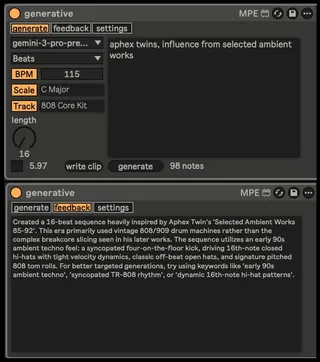
Gemini MIDI Composer is a powerful Max for Live bridge that brings the creative intelligence of Google’s Gemini AI directly into your MIDI tracks. Whether you’re stuck on a melody, need a complex drum pattern, or want to explore harmonic variations within a specific scale, this device transforms simple text prompts into professional MIDI sequences in seconds.
🚀 What it does
Unlike generic MIDI generators, this device uses a sophisticated "context-aware" bridge. It automatically detects your track's instrument, project BPM, and selected scale to ensure that every note generated fits perfectly into your current production.
✨ Key Features
Prompt-to-MIDI: Describe what you want (e.g., "A dark techno bassline" or "Happy 80s synth chords") and watch the MIDI notes appear.
Multi-Mode Generation: Switch between Monophony, Polyphony (Chords), and Drum/Beat modes with specialized logic for each.
Smart Scale Integration: Stay in key effortlessly. The AI respects your project’s root and scale (from C Major to Phrygian Dominant).
Real-time Sequencing & Clip Writing: Preview your generation immediately with the built-in sequencer or "flush" the notes directly into an Ableton Live session MIDI clip.
AI Feedback System: The device includes a dedicated "Info Tab" where the AI explains its musical choices and suggests better prompts to help you refine your sound.
Persistent Configuration: Saves your API key and preferences globally, so you're ready to create the moment you drop the device onto a track.
🛠 Technical Details
Requires a free Google AI API Key. Get free tier at https://aistudio.google.com/app/api-keys
Comments (3)
lol
Regarding using other track as a prompt source and combining with additional promts is very good idea. This opens whole new world of possibilities. Will be released in upcoming versions.