Concentrate 1.3 - Strip Silence
Concentrate is the strip-silence tool Ableton Live has been ...
- Type
- Audio Effect
- Author
- manyheads
- Version
- 1.3
- License
- Commercial
- Live version
- 12.2
- Max version
- 9
- Downloads
- 0
- Updated
- 2026-05-08
Concentrate 1.3 - Strip Silence is an Audio Effect for Ableton Live by manyheads, distributed as a commercial (paid) device. It targets Live 12.2 and Max 9. First published 2026-03-19, last updated 2026-05-08. 5 user comments below.
New to Max for Live? Read what Audio Effects do, what the Commercial license means, how to install a device.
Description
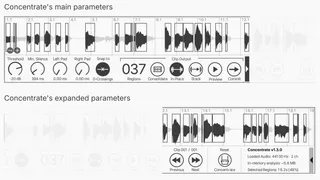
Concentrate is the strip-silence tool Ableton Live has been missing, and an essential tool for prepping samples for chopping. You can drop it on any audio track in Arrangement View to replace low-level noise with silence, or to remove quiet gaps between sounds.
Features include:
* Output each sound region you're keeping to its own clip, or output a single clip that includes all regions with silence between them.
* Keep sounds in place on the timeline or stack them back-to-back.
* Navigate between unlimited audio clips on a track and apply changes to any of them.
* Precise controls allow you to carefully hug the sounds you want to keep, or give them some breathing room.
* Optionally Snap to Zero Crossings to make the edges of your selected sounds snap to the center line of the sound wave to prevent clicking and popping.
Comments (5)