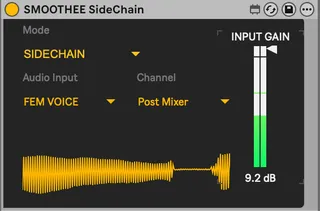
SMOOTHEE SIDECHAIN by grzebien
External Audio Routing for Ableton Audio Effect Racks ...
- Type
- Audio Effect
- Author
- grzebien
- Version
- 1.2
- License
- Attribution
- Live version
- 12.3.8
- Max version
- 8.6.5
- Downloads
- 211
- Updated
- 2026-05-06
SMOOTHEE SIDECHAIN by grzebien is an Audio Effect for Ableton Live by grzebien, distributed as Creative Commons Attribution. It targets Live 12.3.8 and Max 8.6.5. On maxforlive.com it has 211 downloads. First published 2026-05-01, last updated 2026-05-06. 16 user comments below.
New to Max for Live? Read what Audio Effects do, what the Attribution license means, how to install a device.
Description
External Audio Routing for Ableton Audio Effect Racks
Function:
A fast and precise audio injection module. It bypasses standard Ableton mixer limitations, allowing you to feed any signal from your project directly into your Rack.
Key Features:
* Total Control: Select any tap point (Pre FX, Post FX, Post Mixer) for every track in Ableton.
* Hardware Ready: Supports external devices sidechaining, enabling you to route signals from analog hardware directly into your Rack chain.
* Zero Latency: The device introduces no signal delay.
* Ultra Lightweight: Extremely low CPU usage.
* Visual Control: Built-in display (operating signal timeline) for real-time monitoring of the processed audio.
Two Operating Modes:
1. NORMAL (Bypass): Transparent flow. Audio passes through without changes to the next effects in the chain.
2. SIDECHAIN (Injection): Replaces the original audio with the signal selected from the menu.
Usage Instructions:
Place the device anywhere in the Chain:
1. Use Mode Normal for standard signal flow.
2. Use Mode Sidechain to replace audio with an external signal – perfect for triggering compressors or gating effects via another track or external hardware.
This device was created for the needs of SMOOTHEE by grzebien_ and is included in the set.
https://grzebien.gumroad.com/l/ejggde
Maybe someone will find it useful.
Comments (16)
https://cycling74.com/downloads/older
Should work. Earlier versions missing live.routing obiect.
I checked on my high sierra OS version.
I can only change from Normal to Sidechain.
Routing isn't available to me. Oh well....Old machine.
https://cycling74.com/downloads/older
install, and reopen ableton.
I chcecked it right now. with older version of max it didn't work. After installed latest 8 vesrion of Max all good! I'm checking on my old MacBook Pro 2012, with High Sierra and Ableton 10.1.43
Nice. That worked out! My b
Thx
Thanks for this audio router, it’s sick. The oscilloscope is actually super useful, especially when I’m stacking a bunch of them in a rack to route ghost signals.
I wanted to ask if you could add a gain knob inside the device. That would let me get rid of Cycling '74’s Audio Sender completely and just use your router for everything instead. :D
Really appreciate the work either way, thank you !
I've been screwing with the whole no input mixer thing, creating feedback to process in Ableton
This device, feeding on to itself in one track with a vinyl noise stimulus/white noise input is absolutely the best feedback option, I've found yet.
Anyone into this, try it. I can't believe how much better the feedback sounds. I've tried this so many ways and this is the thing. I will definitely suggest this to others.
Nice work Grezbien
Could you please shoot me an email at dreadlion13 at gmail dot com?