- Type
- Instrument
- Author
- sublamp
- Version
- 1.0
- License
- AttributionNonCommercial
- Live version
- 8.1
- Downloads
- 3,667
- Updated
- No Updates
scrubmixer is an Instrument for Ableton Live by sublamp, distributed as Creative Commons Attribution-NonCommercial. It targets Live 8.1. On maxforlive.com it has 3,667 downloads. Published 2009-12-28. 5 user comments below.
New to Max for Live? Read what Instruments do, what the AttributionNonCommercial license means, how to install a device.
Description
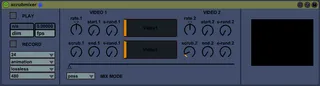
Loop, mix, and scrub two quicktime videos. Drag a video to either of the black bars in the center (which also act as loop point and playhead viewers for either video). Control the loop points with START and END. S-RAND and E-RAND control how far either loop point will wander on each playthrough. SCRUB controls how grainy the START knob acts when scrubbing through the video (jumpy or relatively smooth). Crossfade with the long fader at the bottom and how the videos are combined with the MIX MODE menu. Quicktime videos can be recorded using the RECORD button, control size quality and codec using the menus below it. Mouse over the external video window and hit the escape key to go fullscreen, hit escape again to minimize.
Comments (5)