- Type
- MIDI Effect
- Author
- c0re
- Version
- 1.4
- License
- None
- Live version
- 12.2.1
- Max version
- 8.6.2
- Downloads
- 220
- Updated
- 2026-06-23
Tuple is a MIDI Effect for Ableton Live by c0re, distributed as freeware, with no license specified by the author. It targets Live 12.2.1 and Max 8.6.2. On maxforlive.com it has 220 downloads. First published 2026-06-15, last updated 2026-06-23. 4 user comments below.
New to Max for Live? Read what MIDI Effects do, how device licenses work, how to install a device.
Description
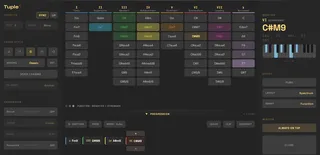
Tuple — every chord in your key, on one grid, always visible.
Tuple is a free, open-source Max for Live chord device. Drop it on a MIDI track
and play harmony like a drum rack: every diatonic AND borrowed chord for your key
sits on one grid, color-coded by degree. No menus, no popups, no theory headaches
— pick a sound and play.
WHAT'S ON THE GRID
• 7 diatonic degrees + a dedicated Borrowed column (secondary dominants & modal
interchange) — every valid chord always visible, never hidden behind a page.
• All 12 keys + major, minor, the modes, harmonic & melodic minor, and pentatonics
— switch and the whole grid re-voices.
• Auto-sync — Tuple follows Live's key & scale automatically; toggle SYNC and it
re-imports on every change (Key/Scale lock while it follows).
• Flat / sharp toggle (♭/#) — read note names whichever way fits your key.
• 5 color logics (spectrum, function, tension, fifths, quality) with an on-grid
legend, so you can read it at a glance.
PLAYABILITY
• 28 voicings — Classic, Piano, Open, Spread, Drop 2/3, Rootless (+ A/B), Jazz,
New Jazz, Quartal, Upper, Sus, House, Prog, Trance, Funk, Organ, French Touch,
Broken, Deep Tech, Detroit, Soul, Clav, Rave, Wide, Power — each with its own
ear-tested identity, from tight jazz to wide electronic textures.
• One-hand grips — every voicing stays in a single register (only Piano spans two
hands).
• Voice leading — Anchor & Flow modes with common-tone detection for smooth changes.
• Expression — Strum (up to ±250 ms, with curve & velocity ramp) and Humanize.
WORKFLOW
• Perform & Capture (CHORDIFY) — play one-note chord triggers live while Live
records them, then click CHORDIFY and every trigger becomes its full voiced chord,
voice-leading included. Timing, feel & note lengths are preserved — Live did the
recording. Undo and CHORDIFY again with a different voicing anytime.
• Progression → Clip — capture chords as you play, drag to re-order, then drop the
whole progression into a MIDI clip, one chord per bar.
• Push 2 — play the grid on the pads, color-coded by degree, plus a Progression
mode: capture a progression and get each chord's substitutes, strongest next
chords, and re-voicings right on the pads.
• MIDI mapping — map 8 key controls to any controller, saved with your set.
• Auto-updater — Tuple checks for new versions and updates you right inside Live
(bigger updates launch the installer for you).
• SMART CHORDS — As you play, Tuple lights up where to go next — by harmonic function
(what resolves / builds tension) or by voice leading (what moves smoothest with your
current voicing). Brighter = stronger. Suggestions, never rails — it works in every
layout, on screen and on Push 2.
NEW IN 1.4
• Perform & Capture (CHORDIFY) — play one-note chord triggers live while Live records them, then click CHORDIFY and every trigger becomes its full voiced chord, voice-leading included. Your timing & feel are preserved.
• Push 2 — Progression mode: capture a progression and get each chord's substitutes, next chords & re-voicings right on the pads.
• Hover-to-preview your progression in the drawer.
IMPROVED
• Reworked voicing engine — now 28 voicings, each with its own ear-tested identity (Nu-House → New Jazz, Jamiroquai → Clav, Trap removed).
• Tighter Extended chords; smart suggestions now follow your progression; leaner engine under the hood.
FIXES
• Progression → Clip now works on recent Live 11/12 (could write an empty clip before).
• Smoother macOS installer.
REQUIREMENTS
Ableton Live 11+ with Max for Live · macOS & Windows.
FREE & OPEN SOURCE
Site & manual: https://tuple.live/
Source: https://github.com/c0remusic/tuple
Community: https://discord.gg/skn5Np6DdP
Version 1.4.0
DOWNLOAD
Visit the site https://tuple.live (maxforlive.com doesn't support zip), click download on the installer that fits your OS (or manually with the zip : extract everything in the same folder, drag the .amxd into a midi track.)
Comments (4)
Interesting though — on my end it loads fine from anywhere, it doesn't need to be in the User Library. That said, I'm looking into making the device find its files more reliably so this stops happening at all. If you hit it again, knowing your OS + Live version would really help me track down the real reason. Cheers for the heads up!
But Version 1.2.2
Arm the track, hit record, not have perform the grid live. Select an empty clip slot in Live, then press CLIP. Nothing happened.