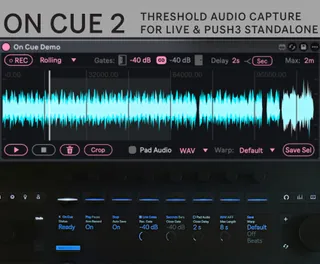
On Cue - Audio Capture Sampler Recorder
*Latest update (v2.0) free demo available. - New recordin...
- Type
- Audio Effect
- Author
- PhaseCtrl
- Version
- 2.0
- License
- Commercial
- Live version
- 12.4
- Max version
- 9
- Downloads
- 0
- Updated
- 2026-07-30
On Cue - Audio Capture Sampler Recorder is an Audio Effect for Ableton Live by PhaseCtrl, distributed as a commercial (paid) device. It targets Live 12.4 and Max 9. First published 2026-07-28, last updated 2026-07-30.
New to Max for Live? Read what Audio Effects do, what the Commercial license means, how to install a device.
Description
*Latest update (v2.0) free demo available.
- New recording mode, Rolling Take. Continuously records the last 1-10 mins of incoming audio
- Select portions of your recording to save or crop before saving
- New Push control bank for reviewing takes in controller & standalone modes.
On Cue is a Push standalone supported Max for Live device that records what's playing on a track and
drops each take straight into a Session-View clip.
Place it anywhere in your audio device chain to record the audio up until that point.
# What to expect
3 ways to Record
- Single Take records one take and holds it for you to audition and save.
- Multi Take writes each take the moment it stops and re-arms instantly — pass after pass into a growing clip stack, without touching the mouse.
- Rolling Take never stops: it records on a loop over a window you set (1–10 minutes), always keeping the last stretch of audio, and hands you that window as one take when you disarm.
- Gate-based auto-capture. Starts on sound, stops on silence; you set the open/close levels and
how long a pause ends a take, or pauses in rolling take mode..
- Pre-roll — a little audio before the trigger is always kept, so soft attacks aren't clipped.
- Your track stays clean— takes go to a separate audio track; your original is never recorded onto, and replay never runs back through its effects.
- Push 3 — all controls are on the push with a live status readout; works on Push 3 standalone.