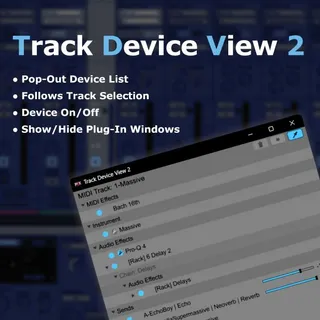
Track Device View
Track Device View 2 is a Max for Live utility for Ableton Li...
- Type
- Audio Effect
- Author
- KOMOFORGE
- Version
- 22.0.1
- License
- None
- Live version
- 12.4.3
- Max version
- 9.1.4
- Downloads
- 0
- Updated
- 2026-07-29
Track Device View is an Audio Effect for Ableton Live by KOMOFORGE, distributed as freeware, with no license specified by the author. It targets Live 12.4.3 and Max 9.1.4. First published 2026-07-27, last updated 2026-07-29.
New to Max for Live? Read what Audio Effects do, how device licenses work, how to install a device.
Description
Track Device View 2 is a Max for Live utility for Ableton Live 12.4.3.
When a track contains many devices, Live’s horizontal Device View can become difficult to scan.
Track Device View 2 displays the currently selected track’s device chain in an easy-to-read vertical list.
Insert Track Device View 2 on one track and open the pop-out window. When you select another track in Live, the list automatically updates to follow the newly selected track.
You do not need to insert Track Device View 2 on every track.
From the pop-out window, you can select devices, turn them on or off, collapse or expand devices and Racks, open or close supported third-party plug-in windows, adjust Send levels, and view devices on related Return Tracks.
Track Device View 2 helps you manage device-heavy tracks without constantly scrolling through Live’s Device View.
Main features:
* Easy-to-read vertical list of the selected track’s device chain
* Track-following pop-out window
* MIDI Effects, Instrument, and Audio Effects sections
* Rack and Chain display, including nested Racks up to a limited depth
* Click a device name to select that device in Live
* Double-click a device name to select and collapse or expand that device in Live’s Device View
* Collapse or expand all devices on the selected track
* Toggle devices on or off directly from the list
* Ctrl-click and Shift-click multiple selection
* Toggle multiple selected devices on or off together
* Open or close supported third-party plug-in windows from the list
* Send names, values, and sliders displayed in the pop-out window
* Adjust Send levels directly from the pop-out window
* Expand Send rows to view and control devices on related Return Tracks
* Delete selected devices, Racks, or Return Track devices from the pop-out window
* Frozen-track detection and editing protection
* Pin option for keeping the pop-out window on top of Ableton Live
* Open or close the pop-out window using Live’s Key Map Mode
Important note:
Track Device View 2 is not an audio effect and does not change the sound.
It is a utility for viewing and managing the selected track’s device chain and devices on related Return Tracks.
Requirements:
Requires Ableton Live 12.4.3 Suite or Ableton Live 12.4.3 Standard with Max for Live.
Not compatible with Live Lite or Intro.
Track Device View 2 requires Max 9.1.4 using Live’s bundled Max for Live environment.
Make sure Live is not configured to use an older external Max installation.