Audio-Automation 2 MIDI-Gear
Write automation directly on your audio track. Since this in...
- Type
- Audio Effect
- Author
- alexxaudio
- Version
- 1.0
- License
- None
- Live version
- 12.0.5
- Max version
- 8.6.2
- Downloads
- 0
- Updated
- 2026-08-07
Audio-Automation 2 MIDI-Gear is an Audio Effect for Ableton Live by alexxaudio, distributed as freeware, with no license specified by the author. It targets Live 12.0.5 and Max 8.6.2. First published 2026-08-06, last updated 2026-08-07.
New to Max for Live? Read what Audio Effects do, how device licenses work, how to install a device.
Description
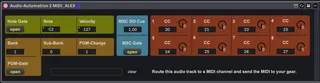
Write automation directly on your audio track. Since this involves MIDI, create a separate MIDI track using the audio track as its input, then route the MIDI output to your external gear. Make sure track monitoring is turned on.
Here are the four MIDI routing options available:
• Single Notes: With velocity support.
• Program Changes: Including Bank and Subbank select.
• MIDI Show Control: Trigger MSC cues via SysEx.
• Control Change (CC): Up to 8 customizable CC parameters.
Gate Behavior: When the gate is closed, no data is transmitted. When open, Ableton sends your values immediately as the clip starts. Automating the gate allows you to launch the clip silently and only send the initial note, Program Change, or MSC cue when needed.
Note: All parameters can be automated in Ableton, except for the assigned CC numbers.
VIDEO: https://youtu.be/U26mYGTt79Y