Toggle Router
Full video explanation here http://www.youtube.com/watch?v=p...
- Type
- Audio Effect
- Author
- tomcosm
- Version
- 1.0
- License
- None
- Live version
- 9.0.1
- Max version
- 6.1
- Downloads
- 1,963
- Updated
- 2013-05-04
Toggle Router is an Audio Effect for Ableton Live by tomcosm, distributed as freeware, with no license specified by the author. It targets Live 9.0.1 and Max 6.1. On maxforlive.com it has 1,963 downloads. Published 2013-05-04. 6 user comments below.
New to Max for Live? Read what Audio Effects do, how device licenses work, how to install a device.
Description
Full video explanation here http://www.youtube.com/watch?v=pztVLtjDR9s
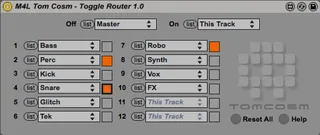
This device switches the output of a track between two other tracks.
1) Set "off" track to the first option
2) Set "on" to the second option
3) Click "list" next to one of the twelve drop down menus
4) Choose the track you want to route from the drop down menu
5) Toggle the track off and on with the button
www.cosm.co.nz
Comments (6)
Could you please tell me how to make this work?
I can't understand what it's doing...
Where should I put this patch?
Thanks,
Mauro.
http://www.youtube.com/watch?v=pztVLtjDR9s
One question, is there any way to get this to work on groups? Thanks :)
Make a track (track A) with the device on it that it reroutes it to track A.
Set track A's monitoring to "in" and change its output to "sends only" (input doesn't matter as long as the monitoring is set).
Make your group, set the monitoring to "in," set the output to "master" and the input to track A.
The device can't reroute to groups so this just creates a buffer between the group and the device.