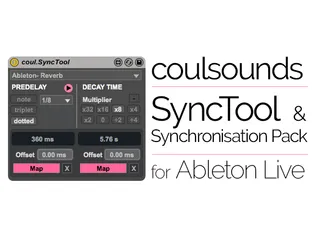
coulsounds - Sync Tool and Synchronisation Pack
The Sync Tool and Synchronisation Pack are devices for synci...
- Type
- Audio Effect
- Author
- coulis
- Version
- 1.0
- License
- Commercial
- Live version
- 9.0.3
- Max version
- 6.1
- Downloads
- 4
- Updated
- 2017-03-08
coulsounds - Sync Tool and Synchronisation Pack is an Audio Effect for Ableton Live by coulis, distributed as a commercial (paid) device. It targets Live 9.0.3 and Max 6.1. On maxforlive.com it has 4 downloads. First published 2013-06-20, last updated 2017-03-08. 8 user comments below.
New to Max for Live? Read what Audio Effects do, what the Commercial license means, how to install a device.
Description
The Sync Tool and Synchronisation Pack are devices for syncing the predelay of reverbs with the tempo of your track. The decay time can also be synchronised and will adapt with the predelay.
There are also alternative controls for the Ableton delays, including a unique sync for the Grain Delay 'Spray' parameter. 3rd party effects with special attributes such as the Waves R-Verb negative predelay or Altiverb's ER and Tail parameters also have sync.
This pack contains a wide variety of synchronisation devices for Ableton Live with Max. They allow you to sync almost any 3rd party reverb effect with a predelay parameter that can be automated in Ableton Live.
Special devices have been created that can synchronise the predelay on the Ableton Live Reverb and Max Convolution Reverbs.
The devices are synced to the global tempo, so if you change the tempo of your project the times will be adapted in real-time.
There are 37 individual devices included in the Synchronisation Pack for controlling specific effects. The new Sync Tool consolidates all of these devices into a single unit.
Included in the download:
Sync Tool v.1.0
Sync Device Packs v.1.1 and v2.0
User manual and readme
Check out http://coulsounds.com for more details.
-
Sync devices supplied in the pack:
Reverbs-
Ableton/Max Convolution Reverb
Ableton/Max Convolution Reverb Pro
Ableton native Reverb
2C-Audio - Aether
Audio Damage - ADverb
Audio Damage - Eos
Audio Ease - Altiverb 6 [including dual ER and Tail with negative delay modification]
iZotope - Ozone 5 Reverb
Korg - MDE-X
Lexicon - Chamber
Lexicon - Concert Hall
Lexicon - Hall
Lexicon - Plate
Lexicon - Random Hall
Lexicon - Room
Lexicon - Vintage Plate
Native Instruments/Softube - RC 24
Native Instruments/Softube - RC 48
TC Electronic - M30
Waves - Renaissance Reverb [includes negative predelay modification]
Waves - TrueVerb
ValhallaDSP - Valhalla Room
Adjustable Sync [for any other reverbs not covered in the pack.]
Delays-
Ableton Simple Delay
Ableton Filter Delay
Ableton Ping Pong Delay
Ableton Grain Delay [with spray sync]
All above devices are now consolidated into the SyncTool. Original devices are still supplied in the download.
Release Notes:
v.1.0
> Initial Release
v.1.1
> All controls updated. Everything on the devices can now be MIDI controlled / automated.
> Updated the negative predelay feature on the Waves RVerb and Audioease Altiverb devices.
> Updated the interface on all multi-sync devices; they are now narrower.
> General improvements to parameter naming and help-window annotations.
> Added 'ValhallaDSP - Valhalla Room' sync device.
v.2.0 - Complete new range of Predelay/Decay Sync combo utilities:
> 9 New devices to control the decay time in sync with the predelay timing.
> Includes a feature to subtract the predelay time from the decay for greater timing accuracy
> Ability to multiply or divide the decay time for longer and shorter times while still staying in sync
> 1.1b update to the Filter Delay Sync utility to fix a visual glitch
> 1.1c update to Filter Delay Sync to fix routing error
Sync Tool v.1.0
> The new Sync Tool consolidates all the prior devices into a single unit.
> Dedicated pdf manual for the SyncTool is provided in the download folder.
Comments (8)
I just bought your creation
I will try it this night
It seems wonderful and i see that you have invested many hours in the process
Thanks to your effort
Do you have any video tutorial about the pack?
If i find any doubt i will inform you to help me
Thanks
Regards
Mario
I'm working on video tutorials at the moment, hopefully I will have a link up this weekend.
Any questions just ask, happy to help :)
I'm glad I spent the big bucks already after just one session in Ableton! It's fantastic having the new Convolution Reverbs pulsing in sync, I have had more fun playing with these devices today than I have playing with half of the iPad apps I've downloaded recently! It really is useful because it lets you really push the reverbs and let them go crazy in ways you wouldn't normally do, but you've got them synced so the chaos never gets too out of hand if you're still trying to create songs and not just noise. Though I fully endorse noise as well.
Well worth it, nice work Mr. Coul, enjoy a pint on me in thanks for your fine devices :)
Excuse me
I had not time to test but now i am testing it and i don,t know how works it?
Did you do the video tutorials?
I have a vocal track and i insert first your coul.Simple Delay Sync,in the same chain,continued i insert Ableton Simple Delay.
The song tempo is in 120Bpm
In your coul.Simple Delay Sync i press the both left and right triplet botton,then appear written 333.333344 ms
Then in The Ableton,s Simple Delay i change the yellow botton Sync to orange Time botton and i write 333.333 in the number ms field and the maximum allowed is 300 ms,what am i doing wrong?
For that is the map pink fields of your coul.Simple Delay Sync?
And the close X?
Regards
Here is the working page: https://sellfy.com/p/D8mB/
...and
His main website still works. Just click 'Software' at the top and scroll down a bit: http://coulsounds.com/
So after re loading the project all synced plugs have lost their values.
No response.
Complete waste of money.