- Type
- MIDI Effect
- Author
- hyakken
- Version
- 1.1
- License
- None
- Live version
- 9.0.4
- Max version
- 6.1.2
- Downloads
- 1,658
- Updated
- 2013-08-02
PocketSeq is a MIDI Effect for Ableton Live by hyakken, distributed as freeware, with no license specified by the author. It targets Live 9.0.4 and Max 6.1.2. On maxforlive.com it has 1,658 downloads. First published 2013-07-03, last updated 2013-08-02. 31 user comments below.
New to Max for Live? Read what MIDI Effects do, how device licenses work, how to install a device.
Description
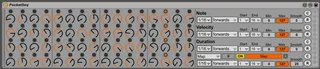
Analog type Sequencer.
I made this for doepfer pocket dial.
You can use without pocket dial.
Pocket dial has 4bank.
First bank for first row.
Second....
First Row Midi CC 0~15
Second Row Midi CC 17~32
Third Row Midi CC 33~48
Last ROW Midi CC 49~64
v0.9
add random and clear buttons to each row
v1.0
Note
speed: CC65(1~7)
direction: CC66(1~5)
start: CC67(1~16)
end: CC67(17~32)
min: CC68
max: CC69
smooth: CC70
random: CC80(1)
clear: CC80(2)
Velocity
speed: CC65(8~14)
direction:CC66(6~10)
start: CC67(33~48)
end: CC67(49~64)
min: CC71
max: CC72
smooth: CC73
random: CC80(3)
clear: CC80(4)
Duration
speed: CC65(15~21)
direction:CC66(11~15)
start: CC67(65~80)
end: CC67(81~96)
min: CC74
max: CC75
smooth: CC76
random: CC80(5)
clear: CC80(6)
Midi CC
speed: CC65(22~28)
direction:CC66(16~20)
start: CC67(97~112)
end: CC67(113~128)
min: CC77
max: CC78
smooth: CC79
random: CC80(7)
clear: CC80(8)
v1.01
multiple issue
v1.02
fixed few bugs
v1.03
fixed midi issue
v1.1
added map option
Comments (31)
But i've noticed when closing ableton the settings made on the sequencer did not save with the project.
When reopening my project bad luck but the nice sequence was gone.
Maybe a way to fix this please?
Thnx in advance sincerly Yann
There are bubbles on the right end.
These are presets.
Shift + click on a bubble,
you can save your seq.
And then you should save the preset.
In this way you can recall your seq.
Thanks.
i mapped the 1st rows seq controls
{quantisation, start-end, direction, etc..}
to the 8 macros when grouped so my apc40 can blue hand those.
then mapped the pitch/vel/dur to my bcr 2000.
almost like having a true analog seq..hehe.
thanks for update!
http://vimeo.com/69774353
not the best quality, gotta work on my conversions, but the sound is sharp
I like your sound.
I updated the patch.
Now you can control almost all parameters by midi cc.
4 seq's triggering 4 different kits.
but each one is still passing its sequence to the other, and/or,
i can't seem to have them running at the same time, without each midi track getting its own sequence..
getting muddled.
thoughts ?
if the problem is unsolved,please report again.
thanks
will be digging deeper tomorrow and building a
pocketseqX4 sequencing rack.
thanks for the update..
cheers
noticing something different..
doesn't seem to play well with abletons arpeggiators
https://vimeo.com/70449411
basics down. enjoy
now abletons arps work just swimmingly, here's a screenshot:
http://sunfalls.org/m/pssc.jpg
i updated the patch.
wonderful wonderful
be sure to set some
Velocity - 2nd row levels
and Duration -3rd row levels.
without those, it doesn't output anything.
or, just hit the R (random) button. and you'll get instant gratification.
that your midi inputs are set to accept midi from pocketseq.
doh! duh. thank you.
say 24 or 32 steps.
perhaps a variation without the bottom CC row.
just thinkin
what dost thou use it for...?
I have updated the patch.
I added map option to the last row.
Now you can map the parameter you want to control.
which preset (dip switch) setting did you use on the pocketdial?
thanks
I don't use initial preset.
I use customized preset.
You can make your own preset by using the editor below.
http://www.doepfer.de/controller/Pocket/pocketeditor.htm
my setteing;
bank1 = cc0~cc15
bank2 = cc17~32
bank3 = cc33~48
bank4 = cc49~64
if you set like this you can control pocketseq.
thanks
Ahh - and maybe it would be useful that PocketSeq stores the Parameters for Min & Max in the Note Row - what do you think?
Now I'm making pocketseq2.
I am going to sell pocketseq2 for 2$.
This is the interface.
http://www.mediafire.com/view/or4uatj7gio2l0u/analogseq.jpg
In this version I can answer your requests.
And maybe this weekend.
tc (at) soundmanufacture (dot) net