- Type
- Audio Effect
- Author
- Nmls
- Version
- 1.1
- License
- Attribution
- Live version
- 9.0.5
- Max version
- 6.1.0
- Downloads
- 1,637
- Updated
- 2014-07-06
Loop and Roll is an Audio Effect for Ableton Live by Nmls, distributed as Creative Commons Attribution. It targets Live 9.0.5 and Max 6.1.0. On maxforlive.com it has 1,637 downloads. First published 2013-09-09, last updated 2014-07-06.
New to Max for Live? Read what Audio Effects do, what the Attribution license means, how to install a device.
Description
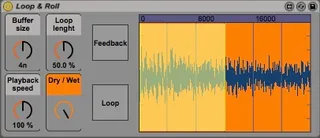
Basically it's based on looping - it constantly records the input signal into a buffer and plays back a part of it in a loop. Here's what you can control:
1.1 UPDATE:
- Fixed the bug with saving the parameters
Overview:
- BUFFER SIZE - from 16th to 1 whole note
- LOOP LENGHT - from 1 to 100% of the buffer size
- PLAYBACK SPEED - from 0 to 200%
- DRY/WET - I guess I don't have to explain it
- LOOP (button) - This button loops the incoming (unprocessed) signal so for example if you will set the loop lenght and playback speed to 100% it will work more or less like a simple looper
- FEEDBACK (button) - Sends the output signal back to the buffer [hint - try to turn it on when playback speed isn't at 100%]
Here's a video which shows the possibilities of this patch: http://youtu.be/jYY0oNA1nSU