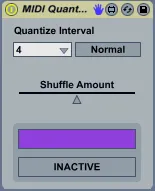
Real-time MIDI Quantize
A simple device that quantizes incoming MIDI notes to the se...
- Type
- MIDI Effect
- Author
- nonagon
- Version
- 2.2
- License
- AttributionNonCommercialShareAlike
- Live version
- 9.5
- Max version
- 7.1.0
- Downloads
- 27,472
- Updated
- 2016-01-05
Real-time MIDI Quantize is a MIDI Effect for Ableton Live by nonagon, distributed as Creative Commons Attribution-NonCommercial-ShareAlike. It targets Live 9.5 and Max 7.1.0. On maxforlive.com it has 27,472 downloads. First published 2010-01-22, last updated 2016-01-05. 41 user comments below.
New to Max for Live? Read what MIDI Effects do, what the AttributionNonCommercialShareAlike license means, how to install a device.
Description
A simple device that quantizes incoming MIDI notes to the selected beat interval. Both note-on and note-off messages are quantized.
Version 2.2 prevents the device from adding to Live's global undo history.
Version 2.0 includes additions by GreaterThanZero ( http://sadfactory.com ):
- Automatic pass-through when transport is stopped
- Triplet mode
- Shuffle
---
If a note-off falls into the same quantization period as its corresponding note-on, the note-off will be pushed back to the next quantization period. Practically speaking, this means that every note will sound for at least one quantization period, even if the note-on and note-off happen in quick succession.
Comments (41)
gonna test it right now,
i have been expecting something like that since a while!
Works great :)
the function is basic but does the job.
Hope you are going to work on update :)
Do you now the quantization script "input quantize within Kontakt3?
that what i would love to see in your patch.
-choice between quantize note on or note off, or both.
-amount of quantize effect
- % of swing (groove in live)
with your patch, the time of the note follows the rate of quantize. for example if i put 1/4, play a short key on my instrument, with no release set, i will have the note sounding related to the quantize setting :1/4
Is equal to have note on and note off swith on in kontak script.
Wold be great to have the choice as mentionned above.
bEST
I agree that an option for enabling / disabling note-off quantization would be nice, and that'll be coming soon. I'll need to do some more research to figure out if / how tapping into the groove quantization system can be accomplished, but I agree that it'd be a good feature.
Likely not going to have a chance to get to this for another week or so, but I promise not to let it slip through the cracks.
Cheers!
sounds good
I'm glad you re up for updating it.
anyway, It takes part of my set now.
:)
please continue to work on this device ( amount of quantize groove ect)
thank you
please ! i cant do that im a nob!
like 3,5,7 ??
merci!
Good work
Max For Live can't tell the difference between incoming notes from your controller vs from your clips. It's all just incoming notes from earlier in the chain. This is a blessing and a curse.
It sounds like you've put the device on your instrument track, affecting every note that reaches the instrument. That's clearly not what you want. Instead, bring your controller in on its own track and put the device there. Use the "MIDI TO" drop-down to send notes from that track to your instrument. Use that same drop-down to send your clips to the instrument from their own track. The effects you place on each source will only affect that source.
------
I've hacked a few versions w/ mappable timing control. Haven't liked any of them yet -- what's your vision for how you would use it?
Thanx!!!
But the only problem if for example i want to Undo something in Live project by going to Edit->Undo
then i have to undo MIDI Quantize ''live toggles'' first
by pressing Ctrl+Z million times)))
Is possible to switch off Undo option for this plugin do we really need it?
Thanks!
I've been thinking that it would be convenient to have a time threshold setting for notes that are either right on the beat/clock or a little too late.
If a note is slightly too late it will be passed on at the next beat right?
But it may not be of any harm if it was actually played. So if there was a time threshold setting in milliseconds one could set that to 0-100 for example and the note would pass through if it arrives before the setting.
Would be grea
http://www.maxforlive.com/library/device/3412/real-time-midi-quantize-mubali-edit
If anyone is interested, I also write a custom edit that maintains note length instead of quantizing note-off as well as note-on. I'd be willing to add that as an option in the next version if there's interest.
I am looking into trying to address this although I am a max novice and may not figure it out. If anyone else knows how please let me know, or if the developer can implement this that would be great!
Thanks for this handy device.
i'm not really used to instal new max4live device is there a particular way or i just need to double clic on the device file when downloaded?
now when i try it signal midi is going to the device but do not get out....
can you help?
thanks
Seems though that upon stop start the groove is sometimes set to the onbeat instead of the offbeat and I can't for the life of me work out what causes it as there's no clear pattern. Can happen with global stop start, scene launch or clip launch. Am I doing something wrong? Can it be fixed to the sequencer metronome to avoid this? MY midi notes are def quantised to grid.
Also a separate shuffle amount dial for on-beats would be beyond amazing :)
I have interest if you mean enforce a minimum note length but allow a longer note to pass unaffected. That would be ideal.
just a problem, the shuffle amont is not saved with my session. I have to reactivate it every time when I load my project.... Any ideas?
been using this device for many years in live 9 but since I switched to Live 10 the output of the notes recorded to a different channel is different to the one i'm hearing on the track. Does anyone else encounter this issue? thank you
I just made a little edit of this WONDERFUL device.
It's now possible to use a quantize setting superior to 1 bar..
https://maxforlive.com/library/device/7393/midi-quantize-2-3
THANK YOU A LOT NONAGON !
First, the default quantization setting is 16 (the fourth item on the list). If it's resetting to anything, it should be that.
And second, there is nothing plugged into that drop-down, nor addressing it remotely.
If I had to guess, I'd say you've MIDI mapped that control, and Live is zeroing out your CC values (and/or sending note off messages) when the engine disables.
More testing required, obviously. I'm not able to replicate the problem.
If that's what's happening, there isn't much to be done about it from within max for live.
(I'd look into perhaps merging your interfaces into a composite audio device.)