a better search for max devices
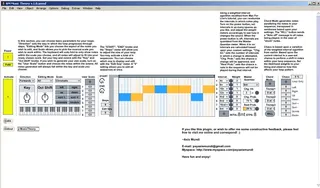
AM Music Theory screenshot

AM Music Theory

by AxisMundi

MIDI Note Generator Plugin *Highly customizable MIDI ...

View on maxforlive.com

Type
MIDI Effect
Author
AxisMundi
Version
1.0
License
None
Live version
8.1
Downloads
15,736
Updated
No Updates

Description

MIDI Note Generator Plugin

*Highly customizable MIDI loop generator plugin.

*Set key, scale (almost 50 to choose from with user scale options added), velocity, note probability, progression, and more.

*Step sequencer automatically folds its keyboard to fit the scale you work in

*Weighted probability algorithms set aspects such as randomization, note variation, and trigger timing.

*Chord and Chaos modes allow you to further evolve your sequence for further improvisational, live, loop generation possibilities.

*Optimized for use with the APC40

Feel free to offer me some feedback!

Comments (18)

  • Markemark29 · January 30 2010
    How can we use this with the APC40?
  • john · January 30 2010
    fantastic, impressive, musical, playable and already lots of recorded material by just messing around and listening carefully!
    thank you very much from john and stockholm.
  • lek · January 30 2010
    really interesting, i'm going to check it.
  • AxisMundi · January 30 2010
    It's optimized for the APC40 by the knobs etc. being assigned to logical FX knobs on the APC unit.
    I'm glad you like it... if anyone has any bug reports or feature requests, feel free to let me know :)
  • Bagatell · January 30 2010
    Aux Diminished blues!! Yess. now how do you plug Shwartzanators Little Brother into this?
  • flashback23 · February 11 2010
    love it! : )
  • AxisMundi · February 17 2010
    Bagatell, can you give me a link referencing what you are talking about? I'd be happy to see what I can do.
  • MikeP · February 20 2010
    Hi AxisMundi,
    Here are the links for the app Bagatell is talking about.
    http://www.schwarzonator.com
    http://www.ableton.com/schwarzonator
  • androgene · March 16 2010
    Hi there great patch , bug report, the effect box stretches out about 25 times to the right with a huge empty space, still new at this so i have no clue what the problem is.
  • AxisMundi · March 29 2010
    Hi there, do you mean the box where you move the notes around? The loop bar can be adjusted independently from the main window. If you wouldn't mind sending me a screenshot of the bug I'd be happy to look at it.
  • zetterstroem · May 16 2010
    Hi.... love it already. But more info/tutorial for the stupid :D (like me)
  • Alphabet · August 06 2010
    Extremely nice device, just having trouble getting the 'chaos' section to work. At this point it doesn't seem to be doing anything - what preconditions should be in place for it to work, eg interval weights, loop only, 'chaos' %?
  • jatrant · September 06 2010
    Hey AxisMundi. Is it possible to make a standalone of just the scale section for incoming midi messages. yours seems to be much better than the default Ableton one and i have an external midi sequencer i would like to control with your scale section. i have already tried seperating yours with no luck so far. it keeps on hitting chords instead of single notes. cheers.
  • dric · October 03 2012
    thx man!! very cool!! :)
  • pvdn · October 04 2012
    Very cool device! I have some questions though:
    - I can't get all notes to play, there always seems to be some random skipping involved, am i overlooking something? I have set all velocities to normal values, i have everything on the right of the edit panel turned off, i have the rest probability set to 0%
    - What exactly does the 'Chg. Int.' do? I see (or think i see) that the 'Chg. Prob.' sets the chance to change the interval, but i don't get the function of 'Chg. Int.'
    - It would be very nice if the random has a range (a low and high setting) between which to randomize.
    -
  • lazzy8 · January 27 2013
    Please do a quick tutorial video!
  • pizu123 · September 16 2019
    It would be very nice if the random has a range (a low and high setting) between which to randomize.
    +1 this is the most important feature I'd like to see
  • tsferro2 · April 14 2020
    very cool - but noticing a big bug in Live 10 - any attempt to undo any changes in Live, even those outside of this device in another track, undo the AM sequencer notes....perhaps I am missing something in order to avoid this?

← Back to search