AutoBeat by K-Devices
AutoBeat is a MIDI device for patterns generation based on p...
- Type
- MIDI Effect
- Author
- kdevices
- Version
- 1.1
- License
- None
- Live version
- 9.0.5
- Max version
- 6.1.3
- Downloads
- 4
- Updated
- 2014-11-21
AutoBeat by K-Devices is a MIDI Effect for Ableton Live by kdevices, distributed as freeware, with no license specified by the author. It targets Live 9.0.5 and Max 6.1.3. On maxforlive.com it has 4 downloads. First published 2013-10-10, last updated 2014-11-21. 5 user comments below.
New to Max for Live? Read what MIDI Effects do, how device licenses work, how to install a device.
Description
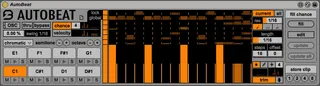
AutoBeat is a MIDI device for patterns generation based on probabilities.
With AutoBeat you create variable beats and fills with just a few clicks!
The device is based on eight 16 steps sequencers. For each step you can define the chance to trigger a MIDI note and its velocity. This creates patterns with continuous changes exactly where you want them! You can set, for example, a 4/4 kick, then add another kick hit on the third 8n at 50% chance. This triggers a new kick note just sometimes.
Each voice has exclusive tools for advanced editing: time resolution, three random functions, offset, loop length and more.
Beside the variations automatically generated on the main pattern, you can also create an alternative pattern via the fill area: then just click the fill button to launch another pattern on the fly.
Being a MIDI device, AutoBeat works with any instrument (not only drums). Furthermore, it has special features optimized for Ableton’s Drum Rack! If this device is used in the same track with a Drum Rack, AutoBeat starts communicating with it getting the drum pads name. Then, editing a drum pad in the Drum Rack, AutoBeat automatically selects that note pads displaying its settings: you will always see the pattern of the pad you are working on.
AutoBeat works great as continuous variations live instrument as well as a smart probabilities writing tool: the store feature allows you to instantly create MIDI clips based on the current pattern with just a click.
Last but not least: the AutoBeat pack contains also 3 Drum Racks!
Here's a quick demonstration - http://youtu.be/r0m59Hb5UnU
And the Ableton Video - http://youtu.be/PZIAoU8xgZs
AutoBeat is available at Ableton.com only - https://www.ableton.com/en/packs/autobeat/
------------------------------------------------
Release Notes v1.1
------------------------------------------------
- Improved GUI
- Improved behavior of scales: they now refer to the note 1, the one in the bottom left, as root note per each scale selected
- Added OSC support
- Added local step sequencer lock for global random and default functions
- Added minimum and maximum values for velocity randomization in the macro area
- Added more scales
- Added semitone transpose for note pads
- 6 new drum racks and 30 new Instrument Racks from Ableton Certified Trainers and producers-
Other minor improvements
Here's a video about the 1.1 update - http://youtu.be/fX6Q-xlC7w4
Comments (5)
Yesterday i bought in ableton Autobeat and it seems wonderful but i would like to know how can i create my own scales to add because there are only major & minor?
Thank you
Regards
For me in the field of maxforlive midi devices Autobeat is the most flexible and creative of all I know so far with its innovative system of random probabilities and its three amazing modes.
Highly recommended
I am very pleased to be able to enjoy ;)