- Type
- MIDI Effect
- Author
- PatrickDSP
- Version
- 2.3.5
- License
- AttributionNonCommercialNoDerivatives
- Live version
- 11.0.12
- Max version
- 8.1.11
- Downloads
- 10,375
- Updated
- 2022-02-18
Keyboard Control is a MIDI Effect for Ableton Live by PatrickDSP, distributed as Creative Commons Attribution-NonCommercial-NoDerivatives. It targets Live 11.0.12 and Max 8.1.11. On maxforlive.com it has 10,375 downloads. First published 2013-10-04, last updated 2022-02-18. 28 user comments below.
New to Max for Live? Read what MIDI Effects do, what the AttributionNonCommercialNoDerivatives license means, how to install a device.
Description
Keyboard Control
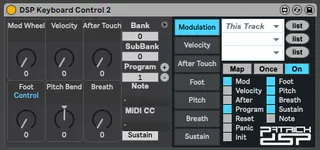
A device to help add features that Push is missing to help control external devices. Mod Wheel, Breath, Sustain, After Touch, Foot Expression, Patch and Bank selection. As well as mod reset and panic buttons.
Also includes a nice note and midi cc display. Enjoy.
Patrick DSP
www.patrickdsp.com
***Update 2.3.5***
Added + / - buttons to patch selections and cleaned up the layout for the latest Live / Max versions.
***Update 2.3.0***
Added parameters to accommodate for the changes in Live 10/Max 8 that allow the parameters to show up on Push devices.
***UPDATE 2.2.6***
Live 10 allows SysEx. This version allows pass thru of all midi data.
***UPDATE 2.2.4***
Added a default OFF state for the patch/bank selector to stop resetting synths to patch 001. Added a toggle for the foot control between MIDI CC 4 and 11 (foot control and foot expression), click on the panel name to toggle.
***UPDATE 2.2.2***
Added Breath Control options.
***UPDATE 2.2.0***
Ableton 9.2.0 now offers the ability to switch the Touch Strip from Pitch Bend to Mod Wheel control, thus we removed the outdated Touch Strip support (the java applets to control it were causing some instability too).
To use the Touch Strip to control any parameter in Ableton, switch the Touch Strip to Mod Wheel mode, then route the Mod Wheel to control any other parameter you wish.
*** UPDATE 2.1.3 ***
Modulation! ;)
*** UPDATE 2.1.2 ***
Cleaned up the interface.
*** UPDATE 2.1.0 ***
Added the ability to map Modulation, Velocity, Aftertouch, Foot Expression, Pitch Bend, Sustain and Touch Strip to anything in Ableton.
*** UPDATE 2.0.3 ***
Added an Initialise button to reset the whole device including the patches and banks to 0. MIDI Panic, MIDI Reset, and Device Init buttons are now assignable by MIDI and Key Maps.
***UPDATE v2.0.2***
Cleaned up coding and added more options to the Touch Strip assignment section.
***UPDATE v2.0.1***
Added Ableton Push Touch Strip mapping ability. Map Push's Touch Strip to any parameter in Ableton Live. You can change the display of the Touch Strip from the Default Pitch Wheel Mode, Fader Mode, Split Fader, or Pin Point Mode.
Note: In some cases the Touch Strip might not return back to it's default functionality. Disabling or reloading the M4L patch resolves this for now.
***UPDATE v1.23***
In some cases the reset button was non-responsive. That is now fixed.
***UPDATE v1.22***
Provided independent control of MIDI CC32 in keeping with Ableton Live's Bank, Sub Bank, Program controls.
***UPDATE v1.21***
Included MIDI CC32 for Bank Change. Some synths did not respond to just MIDI CC0 for Bank Change requests.
***UPDATE v1.20***
Added 128 Banks instead of 16, and adjusted the layout so the most used parameters are located on Push's first device bank.
***UPDATE v1.11***
Added Note Feedback display for PUSH's LCD. Never get confused as to what key you're playing again. This feature also has an on off button to avoid flooding the undo history.
***UPDATE v1.01***
Better Program Change and Bank resolution with Push. Added more Bank selection options.
***UPDATE v1.00***
Added input on/off switches as a workaround for Ableton's undo history being flooded whenever playing live with a keyboard or Push. The dials remain active, but you can now turn off Live's ability to listen to external inputs for Pitch Bend, Mod, Velocity, AfterTouch, and Foot Expression Control.
Comments (28)
Does bank only goes up to 16? or I am doing something wrong?
Yes it would be very usefull to increase it up to 127, some vsti's allow up to 127 folders.
This for Push control of vsti's is great
http://www.native-instruments.com/en/support/knowledge-base/show/87/how-to-switch-plug-in-presets-via-midi-program-change/
I was wondering if there is a way to map the panic/reset buttons to a key or midi and if so is there anyway that when i press it it defaults to a default program such as [Bank=0; Sub Bank=0; Program=33].
The reason for this is because sometimes during live performance sometimes Ableton doesn't load the proper program (I'm using Massive btw as my main synth) and because of that i must have a safe button to instantly change the program to a safe one.
Thanks
andycode.net
But in your case a faster way to change default program and bank numbers would be within your midi clips in Ableton. just have a number of empty midi clips set to program patches you use live.
Scroll down to the section called "Using Program Change Messages"
https://www.ableton.com/en/articles/using-external-synthesizers-live/
Good luck.
However, at numerous occasions I've had to remove and reinsert the device since it seems to suddenly loose it's function altogether. I keep twisting the knobs but no messages are being sent. That's when i've been forced to delete the plugin from the track and then load it into a MidiEffect Rack chain which I have muted, to prevent the prg change message being sent on. I then redo the mapping and unmute the chain. Most of the time it works excellent but it gets a bit annoying when you've done it loads of times especially on large sets. Maybe a button for switching Program Change and Bank change on/off, by default set to off.
Another thing I've pondered with this great device is why Expression is Foot Ctrl CC#4 and not Expression CC#11.
And while I'm at it, I really liked the previous version 2.x.x when it still had the touchstrip functionability. Dedicating the touchstrip of Push exclusively to this device made it possible to have any other track selected even audio tracks and still have the dedicated function of the touchstrip. When using the touchstrip as a "Global" PitchBend this seems to me the most sensical way since tracks nowadys are autoarmed. It was a bit buggy but it was still cool. With the updated function of your device as well as Push I have to manually select my "MidiCtrl"-miditrack and then play with the touchstrip thus taking away some of the spontaneity of it. I hope you understand my point. I also liked the different modes of TouchStrip functions...
Either way I am most grateful for your work!
I took some of your considerations into effect. I've added a default OFF state for the patch/bank selector to stop resetting synths to patch 001. Added a toggle for the foot control between MIDI CC 4 or 11 (foot control or foot expression), click on the panel name to toggle.
As for bringing back the Push Pitch Bend, the java scripting to control it was a cause of a number of problems with this patch. Otherwise, this patch just contains basic midi messages. The soon to be released Live 9.2 gives you the ability to switch Push's touch strip from a pitch bend to a mod wheel, thus eliminating the need for this function. https://www.ableton.com/en/blog/live-9-2-in-public-beta/
JohnRozz: this patch was originally made to provide feed back while using push or another midi keyboard to control external hardware. Velocity is tied into the modulation section, so you can assign input velocity to any parameter within ableton. ie, Input velocity can control the amount sent to an reverb effect.
That is awesome, will try it out! Thanks!
I noticed that the touchstrip was a bit buggy in your previous version so I can understand you let go of that. I can't figure out though how to make the touchstrip Pitch Bend several instruments while having a Drumrack selected, making it scroll up/down the drumrack instead when i touch the strip. The touchstrip seems to always be dedicated to the track that is armed or selected. Maybe I'm missing something.
Great job!
If i change the bank from the Keyboard Control 2.2.4 the Virus C is ok but if i made a bank change from a clip the Keyboard Control 2.2.4 made it didn't works.
Could you solve this?
Sorry for my poor english lol
This patch will make my virus buttons live more years :D
I'm looking for a possibility to send multiple program change messages with a single clip. Simply by drawing an automation. Looks like this should be possible with your device!
Unfortunately I dont get any output of an program change message... Is there something special i have to pay attention to?
Thanks!
***UPDATE 2.2.4***
Added a default OFF state for the patch/bank selector to stop resetting synths to patch 001.
so, expand the patch and enable program changes.
Thank you for such a great device! It has helped me out a lot!
I have a problem though, i'm desperately trying to map the sustain pedal port to control Looper with just a momentary MIDI-message. I can't get the pedal to control looper without switching to usermode and this is a real struggle.. Any solutions to this? The looper multipurpose controller is not showing up in the list of available parameters either.
Ive tried you plug in and really like what its doing.
But I have one problem.
When the Plug in is on a midi track It seems when is switched to on that its blocking all other midi messages thru my external synth ?
Cant modulate anything else than the mapped pitch wheel.
Any Idea ?
I'm running 9.7.5 and I use 8 instances of this DSP, 1 in each track.
I've been getting some random crashes when the Sustain is ON. It may not crash quite after I turn ir on but eventually after a few seconds or even minutes it will.
Btw has anyone else experienced this?
Thanks