- Type
- Audio Effect
- Author
- yop44
- Version
- 1.0
- License
- None
- Live version
- 9.0.6
- Max version
- 6.1.4
- Downloads
- 1,803
- Updated
- No Updates
PushMLR is an Audio Effect for Ableton Live by yop44, distributed as freeware, with no license specified by the author. It targets Live 9.0.6 and Max 6.1.4. On maxforlive.com it has 1,803 downloads. Published 2014-02-17. 9 user comments below.
New to Max for Live? Read what Audio Effects do, how device licenses work, how to install a device.
Description
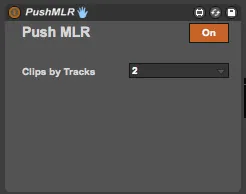
Clip chopper for Push
Here is a little demo : https://www.youtube.com/watch?v=tCSIHsVtEGI
Comments (9)
Do you have any plans to implement the pattern looper from mlrv? that would be rad
I would totally pay $30 for this, easily.
You can use any track is the set by pressing arrows and move across the session.
in 32 AND 64 bit configurations
running Mac OS X 10.9.2
Do i just need to wait for the update?
I would kindly pay you!!!!
in 32 AND 64 bit configurations
running Mac OS X 10.9.2
Do i just need to wait for the update?
I would kindly pay you!!!!
Good you explain a little what this does exactly - or how to use a little more? What you do in the vid seems fun but I cannot replicate that functionality.
Cheeky tutorial vid?
Thanks
So you need to place the device on the last channel you want to be effect in the chain. So far example if you had 10 channels and you wanted to use the device on channels 1 -> 5 you'd place it on the 5th channel. Personally, I place it on the master channel.
Next, you need to turn it 'On' - you should see the pressure pads change 'display'. each horizontal row represents where in the sample you jump to.
Important: You need to make sure each sample has 'loop' activated - It's also a good idea to set Launch Quantization to 'global' and then set the grid you want to use from the global quantize button (this allows you to use another M4L device for push that allows you change Global Quant from push using shift + quntize i think)
the only thing I haven't really figured out is what the Clips by Track does.
hope this helps... someone haha