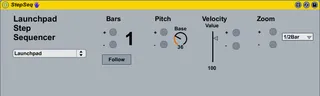
Launchpad Step Sequencer
Another step sequencer, there are already so much but I made...
- Type
- MIDI Effect
- Author
- yop44
- Version
- 1.1
- License
- None
- Live version
- 8.2.2
- Max version
- 5.1.8
- Downloads
- 1,924
- Updated
- 2012-01-05
Launchpad Step Sequencer is a MIDI Effect for Ableton Live by yop44, distributed as freeware, with no license specified by the author. It targets Live 8.2.2 and Max 5.1.8. On maxforlive.com it has 1,924 downloads. First published 2011-10-12, last updated 2012-01-05. 11 user comments below.
New to Max for Live? Read what MIDI Effects do, how device licenses work, how to install a device.
Description
Another step sequencer, there are already so much but I made one that fits my needs, and finaly share it.
Features :
- Use the current midi clip
- You can set the Bar you are editing or follow playing position, Pitch, Velocity and Zoom (1 Bar or 1/2 Bar)
- Disabling the device let the user 2 mod free for other devices.
Enjoy!
Comments (11)
Keeping 'user 2' free is amazing. I am running two of them on seperate tracks and I only have to click on each track to view it on the launchpad.
If you drop a groove onto the midi clip it plays back with the groove! Sick!
I find that having follow turned on glitches ableton a little bit.
Is it possible to use the direction buttons on the launchpad to zoom in and out and up/down bars?? Then I don't need to use follow..
Keeping 'user 2' free is amazing. I am running two of them on seperate tracks and I only have to click on each track to view it on the launchpad.
If you drop a groove onto the midi clip it plays back with the groove! Sick!
I find that having follow turned on glitches ableton a little bit.
Is it possible to use the direction buttons on the launchpad to zoom in and out and up/down bars?? Then I don't need to use follow..
Keeping 'user 2' free is amazing. I am running two of them on seperate tracks and I only have to click on each track to view it on the launchpad.
If you drop a groove onto the midi clip it plays back with the groove! Sick!
I find that having follow turned on glitches ableton a little bit.
Is it possible to use the direction buttons on the launchpad to zoom in and out and up/down bars?? Then I don't need to use follow..
I have just notice that I can't move midi notes around on other clips, is this normal?
thanks for comments.
Yes, you can map the direction button of your launchpad to the sequencer button like +/- bar button.
I did'nt notice that before. While using the step sequencer you can not move midi notes. You can only edit them in drawing mod. I don't know if it's a bug, I 'll try to figure it out.
P.S. I uploaded a new version correcting some bugs.
Drawing mod? that might be a useful work around! Thanks!
I thought if I midi mapped the direction buttons on the launchpad, they lose there association as scene/track direction buttons??
Such a great device though.
Drawing mod? that might be a useful work around! Thanks!
I thought if I midi mapped the direction buttons on the launchpad, they lose there association as scene/track direction buttons??
Such a great device though.
Drawing mod => When you edit your midi clip, then Ctrl+B
Thanks for the feedback :)
thanks for making the device. hopefully get to use it live soon!
cheers
lem