- Type
- Audio Effect
- Author
- jamari
- Version
- 1.0
- License
- AttributionNonCommercial
- Live version
- 9.0.6
- Max version
- 6.1.6
- Downloads
- 792
- Updated
- 2014-03-27
jmr.browser is an Audio Effect for Ableton Live by jamari, distributed as Creative Commons Attribution-NonCommercial. It targets Live 9.0.6 and Max 6.1.6. On maxforlive.com it has 792 downloads. Published 2014-03-27. 10 user comments below.
New to Max for Live? Read what Audio Effects do, what the AttributionNonCommercial license means, how to install a device.
Description
Ever wanted to use Max for Live as a Webbrowser? Cause now you can!
Based on Max's "jweb" object integrated into a m4l device with useful controls.
It is very straight forward and self-explanatory.
It is made in an audiodevice so you can put it on any kind of track in live. The audio doesn't get modified and gets direct through. Just put it on any track you like (for instance the master channel).
Wanna check your Facebook/Twitter Stream while working on a project in Live without using a browser like Firefox? With jmr.browser this is very easy!
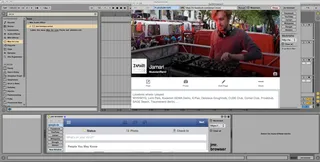
You can even open up a floating window by clicking on "New Window" that will stay on top all the time. (as shown in the screenshot)
The shortcuts to some webpages can be easily modified with some basic m4l knowledge but if you're not that good in m4l you can also easily add your own bookmarks in the bookmarks-section.
I recommend using the mobile webpages with the device because they load quicker and are better to read with such little space. The shortcuts are all loading the mobile versions of the pages.
If you have some ideas how to improve the device feel free to contact me! Also if you used this in any of your works it would be nice to hear about that :-)
To-Do List:
1.) Make it possible to store webpages/bookmarks with sets, so you can have webpages as notes in your Live sets.
2.) Clean Up ;-)
Comments (10)
It will simplify the sampling from YouTube.
Ableton did an Aprils Fools with a 'Facebook for Live', but this is real!!!
Ableton did an Aprils Fools with a 'Facebook for Live', but this is real!!!
Could anyone help with how to solve that?
Thanks!