BeatStep SpeedDialer
The Arturia Beatstep is a great device, but with its current...
- Type
- Audio Effect
- Author
- pyrolator
- Version
- 0.9
- License
- AttributionNonCommercial
- Live version
- 9.1.1
- Max version
- 6.1.5
- Downloads
- 1,953
- Updated
- 2014-04-05
BeatStep SpeedDialer is an Audio Effect for Ableton Live by pyrolator, distributed as Creative Commons Attribution-NonCommercial. It targets Live 9.1.1 and Max 6.1.5. On maxforlive.com it has 1,953 downloads. Published 2014-04-05. 11 user comments below.
New to Max for Live? Read what Audio Effects do, what the AttributionNonCommercial license means, how to install a device.
Description
The Arturia Beatstep is a great device, but with its current firmware the encoders are much too slow. It takes 5 turnes to get thru all 128 values.
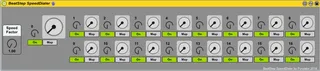
I made this speeddialer to make fast movements possible. Just give a speedfactor (arround 5 is good for me).
You see two dials - the small one shows the real value, the second, bigger one shows the multiplied value which can be mapped to any function within Ableton Live.
The values are interpolated with a ramp, so you should not hear any glitches.
Comments (11)
But on my DAW there are stray noises when I turn the dials.
If speedFactor is "0", there are no cracks.
I load it, but my beatstep knobs do not match your device. Some do, but others act on the "on" buttons of the device. I am doing something wrong?
If there is no solution, I will have to remap the betstep to your device, and save it as a template. Or edit my beatstep with the Arturia midi control center, so that the controls match with your device.