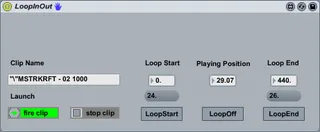
CDJ Style LoopIn-LoopOut
*WARNING* This device only works properly with Midi or Ke...
- Type
- Audio Effect
- Author
- zpectro4
- Version
- 1.0
- License
- AttributionShareAlike
- Live version
- 8.1
- Downloads
- 1,925
- Updated
- 2010-02-23
CDJ Style LoopIn-LoopOut is an Audio Effect for Ableton Live by zpectro4, distributed as Creative Commons Attribution-ShareAlike. It targets Live 8.1. On maxforlive.com it has 1,925 downloads. Published 2010-02-23. 5 user comments below.
New to Max for Live? Read what Audio Effects do, what the AttributionShareAlike license means, how to install a device.
Description
*WARNING*
This device only works properly with Midi or Keyboard. Make sure setup Midi or Key to button 'LoopStart', 'LoopEnd', 'LoopOn/Off'
(Anyone who knows why works wrong with mouse click and works well with Midi and Keyboard, Let me know plz. Actually I already make this device which works properly with mouse previous week, but it does not with Midi or Keyboard, so I have VERY HARD TIME to Debug. :( )
*Preview*
The most uncomfortable thing of Ableton Live is looping compare with CDJ.
Although, we can loopIn-LoopOut with using 'loop-start' and 'loop-end' buttons beneath the loop button on clip winddow, but its minimum loop length is only four-beat and loop-start always multiples of four.
(May be I can`t use Ableton Live well. If someone knows how to manipulate loop like CDJ Style with basic Ableton Live function, shortcut, or device, let me know plz)
With this m4l device 'LoopInOut', You can LoopIn-LoopOut anywhere, anylength.
*How to Use*
As I warned you before, It only works properly with Midi or keyboard.
1. Put the device on master track.
2. Setup Midi or keyboard to button 'LoopStart', 'LoopEnd' and 'LoopOn/Off'
3. It works to Clip on detail view.
4. Basic Routine is 'LoopStart'-'LoopEnd'.
5. No more instruction, You can easily find how it works.
*Plan of Next Vesion*
On next version, I`m trying to make more options, see the lists below.
1. Pre-set LoopLength==1/16 to 1Bar
2. LoopCounter==LoopLenth will decrease every multiples of four LoopCount.
3. Something You suggest.
Comments (5)
Thanks!
I`m working on so hard to make next version of it (spending almost 5-hours everyday-I think I`m not efficient at max)
Knob looks like good, but I`m using APC40 and there`s no physical lock on knob so, I`m trying to make it as button.
But, I think may be I just make it as dial, and midimap to button, it could be nice.
anyway, see ya~!
I made next vesion of LoopInOut, but it seems like too different from original one, so I decide to release it in different name.
The next version of LoopinOut is now called LoopMaster.
If you want to see it follow the link below.