D16 Nepheton - Drum Rack for Push
This Drum Rack contains a few M4L Patches to control the VST...
- Type
- MIDI Effect
- Author
- Datengeist
- Version
- 1.0
- License
- None
- Live version
- 9.1.2
- Max version
- 6.1.6
- Downloads
- 2,438
- Updated
- 2014-04-16
D16 Nepheton - Drum Rack for Push is a MIDI Effect for Ableton Live by Datengeist, distributed as freeware, with no license specified by the author. It targets Live 9.1.2 and Max 6.1.6. On maxforlive.com it has 2,438 downloads. Published 2014-04-16. 11 user comments below.
New to Max for Live? Read what MIDI Effects do, how device licenses work, how to install a device.
Description
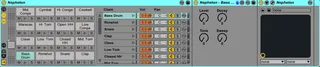
This Drum Rack contains a few M4L Patches to control the VST. Using the External Instrument device only doesn't fit my need because i want to select a cell and adjust the parameters without diving into many menus and other restrictions.
But there is still one restriction: Ableton Live supports only 12 VST Outputs but there are 17 Pads available. A few sounds are now sharing a output so it's a bit tricky to mute them in the Step Sequencer.
Example: Play a Hi Tom and now mute it. You hear the sound at ~half volume and you should mute the Hi Conga also to mute the Output completely. Maybe a Drum Rack Wizard can do some magical routings to fix it ;-)
1) Load the Drum Rack
2) Disable Internal Sequencer
3) If necessary: open Nepheton and import Midi Mapping (Drum Rack Default.drccmap)
4) Play with it
When i get more knowledge i will make it:
- beautiful
- controlling more functions
- maybe adding FX racks
I also done this for:
D16 Drumazon - http://www.maxforlive.com/library/device/2259
Sonic Charge Microtonic - http://www.maxforlive.com/library/device/2263
Recommendations and Ideas are welcome!
Comments (11)
I have loaded the patch of yours having dropped the files into the relevant parts of the user library so it auto finds the patches. I imported the map you included via Load Midi CC Map - that doesnt change anything, but you mention above the Load Drum Map option and I wonder whether this is the missing component? What do you think? Currently mine is set to Factory Mapping.
Ableton version is 9.1.2 with latest Max and my Nepheton is 1.4.
great work anyway and maybe I am being dim? Thanks
ok you loaded the Drum Rack and you can see the M4L Patches inside each cell. Can you see the "Level", "Decay" etc. parameters on the Push Display?
When yes then there must be something wrong with the imported Midi Mapping. Please go into About/Options and in the last Tab you can import the "Drum Rack Default.npccmap". Make shure that it display "CC1 Bass Drum Level", "CC2 Bass Drum Tone" and so on. I didn´t use the Drum Map Tab!
I hope it will work, please tell it to me! :)
Thanks for your words. Another problem is that every paramter change will flood the undo history. I know why but i don´t have the knowledge to fix it atm. Im working on it :D
one suggestion if i may... Put all the knobs in one device and put them onto a dummy pad. All those midi thru routings actually add just a microsecond of latency to the track.
Get it from the link below
http://www.maxforlive.com/library/device/2927/d16-nithonat-drum-rack-for-push-1-0
All credit should go to Datengeist.
thanks for these patches, have been using them since years.
but since Live 11 they create audio breakdowns.
i guess it's a easy fix, because they still work. just after a while the audio pass thru stops working.
Best
D