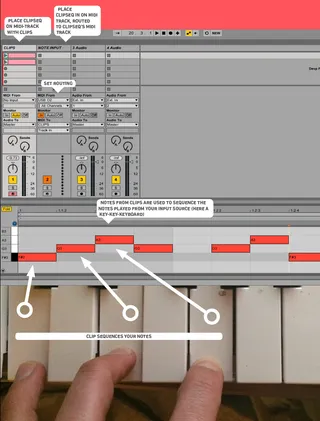
CLIP SEQUENCER - sequence notes via clips
use midi-clips to sequence incoming ("played") midi-notes ...
- Type
- MIDI Effect
- Author
- bennniii
- Version
- 1.0
- License
- AttributionNonCommercialShareAlike
- Live version
- 9.1
- Max version
- 6.1.4
- Downloads
- 3,147
- Updated
- 2014-06-10
CLIP SEQUENCER - sequence notes via clips is a MIDI Effect for Ableton Live by bennniii, distributed as Creative Commons Attribution-NonCommercial-ShareAlike. It targets Live 9.1 and Max 6.1.4. On maxforlive.com it has 3,147 downloads. First published 2014-04-13, last updated 2014-06-10. 18 user comments below.
New to Max for Live? Read what MIDI Effects do, what the AttributionNonCommercialShareAlike license means, how to install a device.
Description
use midi-clips to sequence incoming ("played") midi-notes / chords (for example via a keyboard) in real time. practical for live performance and composition.
notes are sorted (and resorted) logically and in real-time, clips are read out via LOM.
quick info:
the device is made up of two parts. one is placed on a midi-track for midi-input; the other one is placed on the track which contains your clips (used for sequencing your input). look at this video to understand:
https://www.youtube.com/watch?v=ypMiNsWslag
please bare in mind: this device is most probably still very buggy. i'm sharing it in a very early stage for anyone who finds it beneficial or is eager to enhance it.
Comments (18)
i'll be updating the device soon. if there's anything you wish to see implemented - let me know :)
i'll be updating the device soon. if there's anything you wish to see implemented - let me know :)
I use it like this: on my first track I place the clip IN and have several clips with chord progressions.
Then on the next tracks I put the CLIP devices and have instruments like a bass, lead and pad. For MIDI IN I refer them all to the progression track.
Then I use the note sequencer of Push to build clips with sequences. All instruments are always in tune, always following the same progression, brilliant!
Finally, when I have created several clips withs sequences based on a few progressions, it is great fun to play in session mode.
http://www.maxforlive.com/library/device/1342/uarp
a) you can have as many sequence(r)s as you like
b) they can all vary in length, (step- and) note count
c) you can freely add notes (live) using eg. push, real-time editing your step-sequence
d) you can change quantizations while your sequence is running
e) and a lot more you could think of.
Can I do the following action with your device?
Example: Note A - C - E on Midi keyboard mapped to an Audio Am chord loop Sample and the same way for other Chords.
Now You can play all chords in real time in Your Daw Like an Auto Accompaniment. This is very useful for song writing or even for Live performance.
In other words this way we make a chord Recognition functionality with real played sample loops used.
i'm not sure if i completely understand. first off: the device currently only works on basis of midi and the live api (no audio processing etc is involced).
do i get you right: you want a drumrack (?) with sampled chords (eg Am). you want your keyboard to play (or automatically be mapped to) an Am-chord, whenever you play this one sample?
I ran into one issue when I tried to have two sets of separate clipin en clip sequencer tracks. That hangs ableton.
thanks for your feedback — yes, this is true for now. it is no big effort to make it work in 2 (or more) instances but i haven't yet uploaded a version capable of this. the "transmission" from the midi-input-track to the track holding your (sequencing) clips uses a variable (eg. send data/midi from "xyz" to "xyz"). obviously, every instance of the device is currently using the same variable, so your routing wont work correctly. if you like, i can quickly build another version with a different variable and mail it to you, so in case it is urgent for you, you'll be able use this workaround. for the long term, i'll think up a way to circumvent this.
I can currently solve it with another workflow - simply focus on one track (bass, lead, etc) after another. I've really great fun making baselines by loading up many midi-riffs in both tracks (the IN and the CLIP track) and then keep combining. This really creates musically great sounds. So no need to do some urgent rebuild, but keep working on this device because it is really great!
Thank you for so much fun already!
Love the device. Great fro improv and composition. I'd really appreciate a version using a different data/midi variable for added flexibility.
Cheers
thanks for your great work! This is something I am looking for since a long time.
Is it possible to improve the capacity to 12 instead of 6 notes and to trigger different notes/chords via different tracks/channels?
Best!