MIDI Note Mapper
With this device You can filter individual MIDI notes (0-...
- Type
- MIDI Effect
- Author
- vertecs
- Version
- 1.0
- License
- None
- Live version
- 9.1.2
- Max version
- 6.1.4
- Downloads
- 2,252
- Updated
- 2014-04-27
MIDI Note Mapper is a MIDI Effect for Ableton Live by vertecs, distributed as freeware, with no license specified by the author. It targets Live 9.1.2 and Max 6.1.4. On maxforlive.com it has 2,252 downloads. Published 2014-04-27. 7 user comments below.
New to Max for Live? Read what MIDI Effects do, how device licenses work, how to install a device.
Description
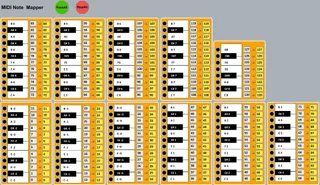
With this device You can filter individual
MIDI notes (0-127) or remap them to different
MIDI notes. Usefull for several purposes.
I use it a lot for MIDI file conversions between
different drumkits.
The original idea for the mutes was by DRIC. I just wanted it to work for ALL MIDI notes and added the remapper.
To MUTE notes just klick on the keys.
For remapping change the values in the yellow
boxes.
Have fun.
Vertecs
Comments (7)
I have an Idea for a device. It is very helpful. The Idea is simple but very useful.
A device that can map more than one note (3 to 5) to a clip. You ask why 3 to 5 notes?
Please read This:
http://audiosex.pro/index.php?/topic/12023-multi-midi-note-mapping-vision-or-reality/
thanks in advance
It´s WAY more time consuming to programme than this one.
Watch this space.....
Would it be possible for you to have your device map the following way.
1
First select the note on your midi keyboard (controller) or with mouse that you like then select where you want it to be mapped with your midi controller?
2
Select range for note value to increase by one continuously
So i.e first could be C3 then selct G5 all the notes would increase consecutively by for that range. Or your range could only increase on the white keys or only increase on the black keys.
3
inputting numbers have tab jump to the next key.
4
Click on the arrow to the right of the fixed key value and have it populate the yellow box with same value
I hope this makes sense.
Again thank you so much for your work I believe that if you pimped out this device it would be a worthy purchase or one hell of a share!