- Type
- MIDI Effect
- Author
- dric
- Version
- 1.2
- License
- None
- Live version
- 9.1.2
- Max version
- 6.1.4
- Downloads
- 1,192
- Updated
- 2014-05-17
Mopho Control is a MIDI Effect for Ableton Live by dric, distributed as freeware, with no license specified by the author. It targets Live 9.1.2 and Max 6.1.4. On maxforlive.com it has 1,192 downloads. First published 2014-05-02, last updated 2014-05-17. 13 user comments below.
New to Max for Live? Read what MIDI Effects do, how device licenses work, how to install a device.
Description
Hello
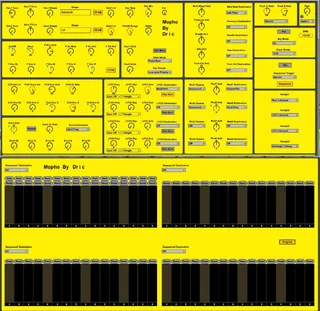
Here my device for controlled my mopho.
You can edit and control all parameters of mopho exept global parameters.
This device is not bi- directionel.
If you edit a preset entirely with this, save on the mopho before close it. remember!
1.1 program bank & program change is automatable now
1.2 Release Env3 Work, not moove the sustain :-)
Comments (13)
one comment, on the esthetics: it doesn't look like the screen print on this page.
when shown in the device chain it looks like part of a stretched mopho and if you maximize the device and it pops up in a new window, the background is bright yellow and the letters are white, which makes it impossible to see which know you're turning.
on the push it seems to work fine though. but it would be nice to be able to read the labels of the knobs on the screen as well.
It would have been nice with some mapped parameters.