J74 Progressive
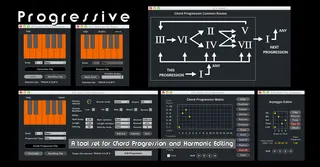
J74 Progressive is a tool set for chord progression making a...
- Type
- MIDI Effect
- Author
- fabriziopoce
- Version
- 4.1.7
- License
- Commercial
- Live version
- 11.0
- Max version
- 8.1
- Downloads
- 3
- Updated
- 2021-12-23
J74 Progressive is a MIDI Effect for Ableton Live by fabriziopoce, distributed as a commercial (paid) device. It targets Live 11.0 and Max 8.1. On maxforlive.com it has 3 downloads. First published 2014-05-23, last updated 2021-12-23. 24 user comments below.
New to Max for Live? Read what MIDI Effects do, what the Commercial license means, how to install a device.
Description
J74 Progressive is a tool set for chord progression making and harmonic editing.
Progressive works by modeling composition techniques (e.g. diatonic method) and performance styles (arpeggio, humanized timing and dynamics) and is capable of producing extremely realistic chord progressions and arpeggios, directly as MIDI clips in Ableton Live Session view.
Besides the chord progression editor, Progressive also includes tools for scale and chord detection, for MIDI clip harmonization (scale based transposition) and chord exploration (Chord Explorer, Circle of Fifths view).
More Information on:
http://fabriziopoce.com/progressive.html
Comments (24)
- Techniques for borrowed chords and accidentals.
- Additional control for chord inversion.
- Additional control to arpeggio settings (note can be omitted).
- Swing, groove and velocity dynamics.
- A new device, the "Audio Analyzer", which processes audio input in real time visualizing notes and extracting chord and scale information.
Here a video about the new MIDI possibilities in Progressive:
https://www.youtube.com/watch?v=gxASv9sha_Q
Here a video about the new Audio Analysis features in Progressive:
https://www.youtube.com/watch?v=v5bxsuOy-N8
Gr
Fab
How do we get the update?
How do we get the update?
Gr
Fab
- Chord Explorer
- Shows the chords available on each degree of on the selected scale
- Allows you to test chords quickly (e.g. what if next chord is this?)
- Triggers for chords can be MIDI mapped (e.g. live use)
- Chord Real-time Sequencing mode
- Allows realtime sequencing of chords in the progression (without MIDI clips).
- Supported: Velocity, Chord Modifiers (7th and alteration, major/minor force)
- Not Supported: Skip, Spread, Inversions, Dynamics (velocity, timing, duration)
- Custom Scale
- You can edit the scale and create a new scale from the Chord Progression Editor (Main window)
- If you use BassLine in combination with Progressive you need BassLine version 1.0.3 to support this on BassLine
(original URL for J74 BassLine can be reused)
- Clip Modifier new Grid Split function:
- Split the notes in the selected clip based on the grid length. Useful to split long, hold notes or chords into rhythmical repetitions.
- Can produce interesting results if combined (after clip commit) with other functions (e.g. [Swing] to produce rhythmical changes or even harmonic rhythm).
- Pitch Shift up/down to next/previous note in scale (keeping octave).
- Custom Chords
- You can now define custom chords shapes for forcing chords out of the diatonic boundaries.
- You can define two different custom shapes and use them freely in your progression
- Forcing chords Roots
- You can now choose a different chord root when forcing, even outside the selected scale. For instance, if you have a C Major scale, you will be able to force a chord to Bb Major.
- Tension updated to show the distance from the diatonic region of the circle of fifths
- Circle of Fifths View
- Visualize relationships between chords
- Change diatonic mode
If you save a preset it will save everything and recalling it will restore everything. Including the progression. If you give it a name (like 1-2-3-6 like the progression or anything) you can find them back.
Gr
Fab
- Improved Live mode:
- Arpeggio editor is now supported in Live mode
- Spread, Low and Skip options are now supported in Live mode
- Chord Explorer and Live mode show the note played on the Main window
- Input Midi shown on the Main window when Live mode is off
- MIDI input mapping to Chord Explorer (e.g. play chords by MIDI input)
Fixes:
- Fix a bug in shift left/right operation on the Chord Progression Matrix
- Fix a bug arpeggio settings (may pickup wrong time for notes)
Gr
Fab
- Clip Modifier Updated with focus on Harmonic Rhythm
- New Split function with sequentiable (re)triggers
- New Preset lists create harmonic rhythm in Clip Modifier (multi-functions)
- New CleanUp function to remove "deactivated" notes from a MIDI clip
- New Float options for managing multiple windows
Fixes:
- Live mode start of clip when Interval is greater than 1 fixed.
- Chord Explorer fifth interval incorrectly sent in output on certain custom chords (** done on M4L, still to be done on SE ** see[++])
- Workaround for Windows users regarding M4L instability with multiple separate windows in M4L (Float setting).
Gr
Fab
Improvements of input MIDI mappings to chords in Chord Explorer:
- Use of note to play chords rhythmically and with velocity
Improvements to Circle of Fifths view:
- Clickable chord buttons
- Shows tension also on Circle of Fifths view
Gr
Fab
Chord Progression Editor:
- New chord modifier for muting the 3rd in any chord (on a per chord basis), making very easy to add suspended chords (sus2 and sus4).
- New shuffle option for random voicing to chords, within the selected scale
- Both above available in clip edit mode as well as Live mode
- Additional inversions which allow chords to extend one octave up
Clip Modifier:
- New Clip Snapshot memory slots for storing MIDI clips content during any operation for later reuse (e.g. for alternatives, copy&paste buffers etc.)
- New Undo-to-Original function available, even if multiple operations have been applied (overrules commit to clip)
- New Auto-Apply mode of operation to immediately hear results of any new tweak (on by default, can be disabled)
- New Pitch Shuffle operation, applies random voicing / pitch changes in a clip, to notes within a selected target scale
- New Beat Shuffle operation, applies time shifting to beats on random basis
Fixes/Improvements:
- Chord Progression Editor: chord modifiers now default on triads with no modifier added (not 7th's). Modifiers are renamed to better represent the options (7th, 9//Add9, add11//7Sus4, add13//6th).
- Chord Progression Editor: Chord Matrix has been completely rewritten and streamlined with many bug fixes.
- Clip Modifier: Commit/Undo/Snapshot have been streamlined so to avoid accidental operations and to fix bugs.
- Chord Explorer: added a new help window for both the Chord Explorer and the Circle of Fifths views
- Chord Detect device: floating window now displays both the MIDI input as well as detected chord on a full keyboard range.
Compatibility with Ableton Live 10.
I'm having an issue with saving presets; none are recalled in Live 10 either after saving the set and/or the device preset. I've tried about everything i can think of, but cannot get it to work.
Thanks in advance.
Roel
Am looking for a auto accompaniment device which detects Chords played by my left hand & plays a set of user-programmed chord patterns (bass line, comping etc), From what you have, I think this cud be possible through this device.
Just wanted to confirm, whether this device wud suffice my requirements?
And I chkd also harmotools & bassline. wud i be needing these too?