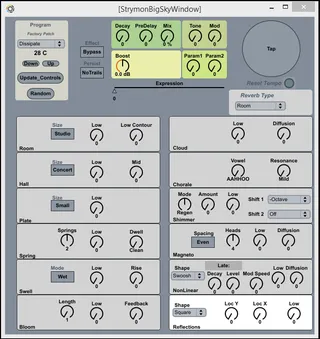
Strymon BigSky Control Device
Control of Strymon BigSky. ######## V1.1 update...
- Type
- MIDI Effect
- Author
- DLWhite
- Version
- 1.1
- License
- None
- Live version
- 9.1.2
- Max version
- 6.1.7
- Downloads
- 609
- Updated
- 2014-06-03
Strymon BigSky Control Device is a MIDI Effect for Ableton Live by DLWhite, distributed as freeware, with no license specified by the author. It targets Live 9.1.2 and Max 6.1.7. On maxforlive.com it has 609 downloads. First published 2014-05-22, last updated 2014-06-03. 12 user comments below.
New to Max for Live? Read what MIDI Effects do, how device licenses work, how to install a device.
Description
Control of Strymon BigSky.
########
V1.1 update
Cleaned up code for updating name and patch number. Added code for using udpsend to update controls on patch change. This now works if you use Max Runtime (not Max for Live, as Live does not pass Sysex Messags) with this patcher:
https://drive.google.com/file/d/0BwQ07Unq5diEMkcwa2luZkNDNUE/edit?usp=sharing
#######
The patch was made to support using Mira on the iPad.
Controls will update if physical knobs are turned.
Comments (12)
This patcher started as a Copy & Modify from the Timeline Control so there's nothing obviously different in the underlying implementation that should have changed. If I have time in the next week, I'll take a look.
I figured it out, but I don't have time to go through everything. The answer is to select one (or more controls) that you want to see on the Push, pull up the Inspector (menu Window Inspector) and modify the setting "Parameter Visibility" to the value "Automated and Stored"
Then the params show up on the Push. I think the tricky bit will be to script the process of having JUST the specific controls (global and selected reverb type) appear. Otherwise all controls appear at all times and that's a little too much.
Not sure I'll update the patch for this as I'm not using my Push this way, but feel free.
I managed to figure the patch out with the Push params by modifying the "Parameter Visibility" value, now the only issue I'm having is that when I push the preset up/down it will only toggle between Bank 0A and Bank 0B presets. Thanks for all your help, I'm kind of learning M4L as I go and have learned more just playing with this patch than I would have imagined.
Can someone help me with a problem ? I downloaded the device and it's working fine. I'd just want to map some of the controls to a midi controller but doing it the normal way doesn't work since the parameters are not shown in the "plugin". I''ve tried this thing above anyway but when I open the device in Max for Live i just can't get it to show me the parameters of the floating window to make them appear in the "plugin".
I hope that makes any sense.
Thanks in advance !
In my version it is not saving the adjustments I made in plug- GUI with the live session, is this right? So then, its pretty useless I think! Hopefully I missed somthn, cause I just want to love it, it seem a great approach and saving lots of production time and hassle.
Thanks anyway, great idea and implementation bro!
https://docs.cycling74.com/max5/vignettes/core/live_automation.html
there is no "save settings" function in this device. If you want, you can save the settings in your Strymon pedal as a patch, but you'll have recall it (use a note in live)
Also, you can edit the patch and create a derivative. I started working on setting saving and hated the way max implemented it... I haven't looked at these in a few years so it might be better/easier now - don't know.