- Type
- MIDI Effect
- Author
- md5
- Version
- 1.1
- License
- AttributionNonCommercialNoDerivatives
- Live version
- 9.2
- Max version
- 7.0.4
- Downloads
- 4,365
- Updated
- 2015-08-01
MIDI-Filter is a MIDI Effect for Ableton Live by md5, distributed as Creative Commons Attribution-NonCommercial-NoDerivatives. It targets Live 9.2 and Max 7.0.4. On maxforlive.com it has 4,365 downloads. First published 2014-10-22, last updated 2015-08-01. 5 user comments below.
New to Max for Live? Read what MIDI Effects do, what the AttributionNonCommercialNoDerivatives license means, how to install a device.
Description
midi filter
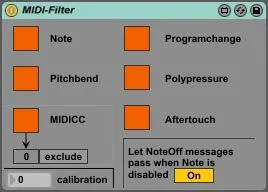
This Device is a simple tool to quickly filter out different types of midi messages, without having to spend hours at different hardware controllers' settings.
It allows you to filter:
-note
-pitchbend
-midi-cc
-programchange
-polypressure
-aftertouch
It also contains two more features:
The "NoteOff" toggle has no functionality as long as the "Note" toggle is enabled. When "Note" is disabled, it allows you to let pass note-off (velocity=0) messages or not. If you disable it, you will experience hanging notes, when you do actions like "play a note -> turn off the "Note" toggle -> release the note". Of course, you can use this "bug" in a creative way, too.
At the bottom of the "MIDICC" toggle you will find an "include/exclude" toggle. When "MIDICC" is on (exclude mode), it allows you to filter out one specific midi-cc message. Simply click on the "include/exclude" toggle and type in the message number you want.
When "MIDICC" is off (include mode), only this message will pass. If you don't need it, just leave it off.
(On Ableton Push's display, becaus of an unknown reason, the midi-cc number can be different. Please do only trust the value on the Ableton Live window on your computer.)
You may also have noticed the "calibration" setting. If your device works fine, just ignore it.
-If you experience hanging midi messages, try to increase the value. Please note that higher values mean higher latency.
-If you have a too high latency, you can try to decrease the value. Please keep in mind that as mentioned above, this could cause hanging midi messages.
--------Update--------
Minor UI-changes, the settings on Ableton Push are now easier to read.
Comments (5)
would it be possible for you to add a list (maybe as a floating window that can be opened) with all the 127 MIDI CCs and add checkmarks before them to quickly disable one or several of them and get an overview of what controller is disabled and what not?
including this feature in my current device structure would probably add much latency. I would either have to redesign the device or to make a new one.
If I make a new one, I will put a reference in the description.
As a workaround, you can use several midi-filters in an effect-rack. If you put one midi-filter per chain and set them to include, you should be able to reach the same amount of control you requested.
Your midi filter device is great and is the first I use anytime I need to filter some midi stuff.
But it seems a bit unstable or unreliable with Live 11 (or maybe with my new Apple Silicon Mac).
Sometimes, it doesn't filter : I didn't figure out exactly how and why, but I had issues recently.
It could be amazing to release an updated version.
Just to "widen the data set": I am also experiencing unstable behavior, like Calagan. More specifically hanging notes. I've done some different tests and can now reproduce the issue:
*Have the "Let NoteOff messages pass" toggle enabled
*Have the Note toggle enabled
*Press down a fair amount of keys
*Disable the Note toggle
->One note is hanging
When I tried pressing down only one note the issue would occur more rarely, but with 5-8 notes at a time, it seems one of them always hangs. I've never observed more than one note hanging.
I run Ableton 11 on Windows 11, on an MSI laptop with decent specs (can post if needed).