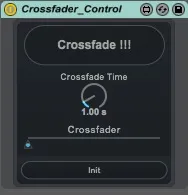
Crossfader Control
This is a small utility to control the Live's crossfader wi...
- Type
- MIDI Effect
- Author
- veedjee
- Version
- 1.1
- License
- AttributionNonCommercial
- Live version
- 9.7.1
- Max version
- 7.3.2
- Downloads
- 1,174
- Updated
- 2017-04-19
Crossfader Control is a MIDI Effect for Ableton Live by veedjee, distributed as Creative Commons Attribution-NonCommercial. It targets Live 9.7.1 and Max 7.3.2. On maxforlive.com it has 1,174 downloads. First published 2014-10-29, last updated 2017-04-19. 9 user comments below.
New to Max for Live? Read what MIDI Effects do, what the AttributionNonCommercial license means, how to install a device.
Description
This is a small utility to control the Live's crossfader with one mappable button.
You can choose the the crossfade time.
If you use it, rate it, Thanks !!
Check my others Device :
http://www.maxforlive.com/library/index.php?by=any&q=veedjee
Update v1.1 : Now work again !
Comments (9)
http://www.maxforlive.com/profile/user/veedjee
The reason to use this format is that in the new maxforlive.com the links that use the ?blah=blah&blah=blah syntax won't work anymore.
Works fine on 9.1.10, but I didn't test others...